GCash OTP Security: In-App Verification and the Fake-Alert Scams It Kills
Key Takeaway
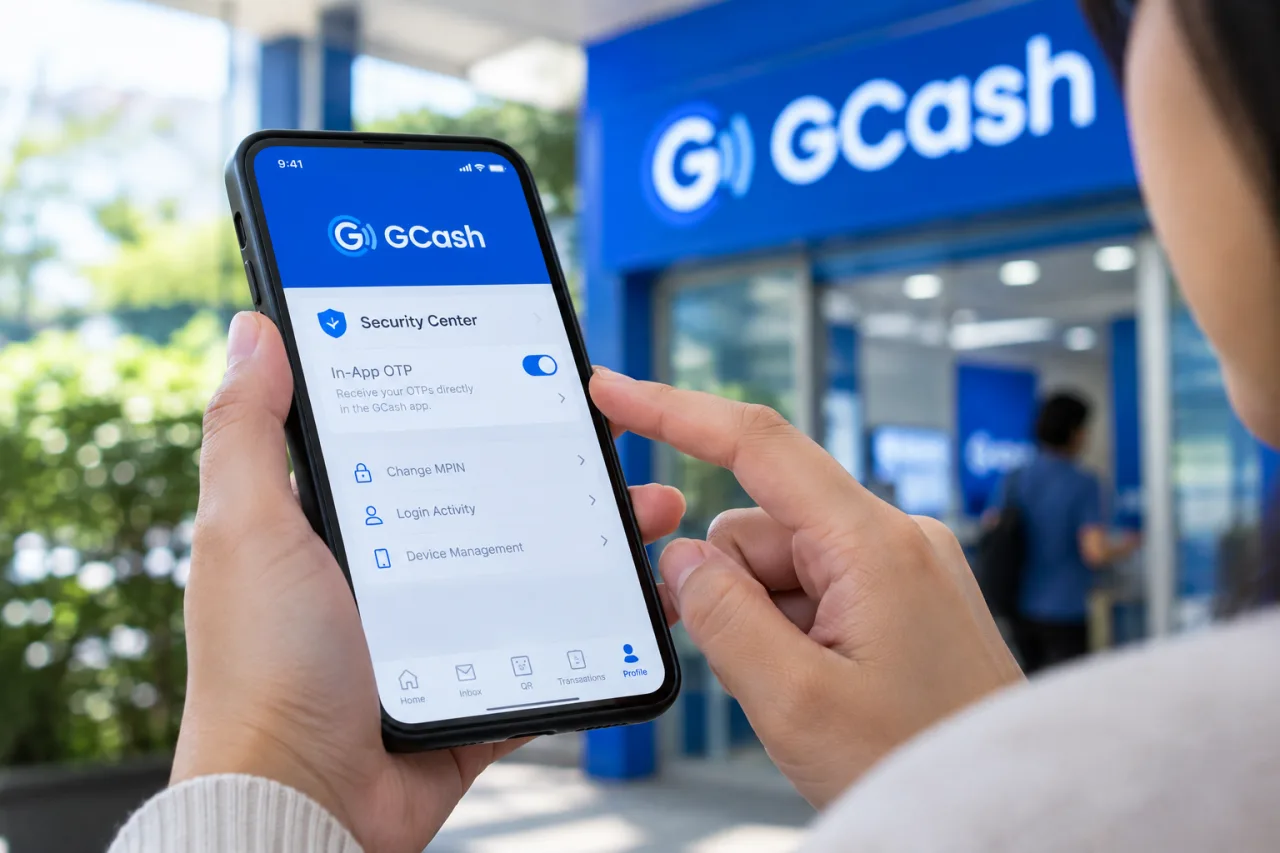
🔐 GCash OTP security moved in-app on purpose: codes delivered inside the app remove the spoofable SMS channel entirely — the same channel every fake-agent, spoofing, and OTP-harvesting play depends on; the setting lives in the Security Center and takes one toggle.
📞 The OTP ring in search exists because of confusion, and confusion is the attack surface: “gcash otp not received today” searches spike exactly when scammers time their plays — the fake “resend” sites, the fake agents offering to “fix” OTP delays, and the SMS-OTP nostalgia the in-app shift retired.
🎣 The harvesting play is one message shape: “Your OTP is expiring — verify here,” “enter this code to stop a transaction,” a link that looks like a resend portal — every version collects the code that IS the transaction, and every version dies the moment codes live in-app and never leave it.
🛡️ The layered rules that make the OTP boring: codes never shared with anyone (real GCash flows never ask), never typed outside the app or a trusted login page YOU navigated to, SIM PIN on the number, and the account lock ready for the suspicious-minute freeze.
🧾 The investigation connection: OTP-harvest cases feed the report lane like every other scam family — the in-app ticket plus the GCash investigation rule the outcomes, and the pattern data from reports is what gets the harvesting infrastructure flagged.
Table of Contents
The GCash OTP question looks like a support topic and works like a security boundary: where the code lives decides which attack lanes exist at all. When OTPs rode SMS, the harvesting plays — fake resend sites, fake agents asking for “the code I just sent,” spoofed message threads — all worked against the same channel. The in-app OTP shift, highlighted in GCash’s own Undas security advisory, took the codes off that channel: the app delivers, verifies, and never asks you to repeat a code to anyone. This guide explains the shift, the confusion searches that spike around it, the harvesting plays that fed on the old flow and the ones that died with it, the layered rules that keep the new flow boring, and the report lane when a harvesting attempt lands anyway — because the OTP question is the account-security question wearing its smallest clothes.
Why the GCash OTP Moved In-App: the Channel Is the Vulnerability
Text-message OTPs carried a structural weakness no amount of user vigilance could patch: the SMS channel is spoofable, interceptable, and visible to whoever controls the SIM. The in-app delivery model flips the GCash OTP trust boundary — the code arrives inside the authenticated app session, where GCash’s Undas advisory highlights in-app OTP as the headline setting to activate — meaning the code can only be read by the person legitimately inside the app, and there is nothing TO read in any SMS. The phishing plays that harvest texted codes don’t break; they starve, because the code the fake site’s “verification” asks for doesn’t exist on your phone anymore. That’s why the advisory leads with this toggle: one setting retires an entire scam family that text-based OTP supported for years, and the SIM-swap lane loses its OTP interception target the same day.
The Confusion Searches: What “OTP Not Received Today” Really Means
The search ring around GCash OTP is mostly real confusion with a scam layer hiding inside it. The legitimate spikes: users who haven’t updated the app, users whose accounts were moved to in-app delivery and are checking the wrong messages thread, users on older devices, and the ordinary queue congestion of peak moments — all support topics, and all resolved in the app’s Help Center or a hotline minute. The gcash otp confusion matters here for one reason: the moment of frustration is the scam’s favorite clock, and the searches that spike today are the audiences the fake-resend portals advertise to tonight. The scam layer is the danger: the fake-resend portals, the fake agents offering to “fix” delays, the messages that promise to release a stuck OTP for a link visit or a code share — each one targeting the moment of frustration exactly because a user waiting for a code is a user primed to type one somewhere. The rule that holds through every confusion scenario: a genuine OTP delay fixes itself in the app or with official support, and the “help” that arrives by message during a delay is the harvesting play, not the fix.
GCash OTP Harvesting Plays: the Four Shapes and the One Defense
The fake resend portal: “Your OTP did not arrive — tap to resend securely,” collecting credentials on a cloned page. Defense: resend happens in the app or not at all; any resend page on the web is the fake, per the advisory’s no-links rule.
The fake support agent: someone calls or messages offering help with an OTP problem, then asks for the code “to verify you.” Defense: GCash will never ask for your MPIN, OTP, or personal details — the absolute rule that makes every version of this ask self-identifying.
The transaction-scare: “A transaction is being processed — enter this code to cancel it,” converting fear into a harvested code. Defense: the app is the transaction authority; cancel-a-transaction flows run inside it, and no text-delivered code has canceling power.
The SIM-adjacent interception: the residual lane where accounts still on SMS delivery meet SIM-swap attacks. Defense: the in-app OTP toggle plus a SIM PIN — the two settings that close this door at the channel level rather than the vigilance level.
The security that works makes verification boring, and the layering runs four deep. The code layer: OTPs never shared, never typed outside the app or a login page you navigated to yourself, never repeated to anyone who says the magic words “from GCash.” The channel layer: in-app OTP enabled, SIM PIN set on the number, and the phone itself code-locked — so even physical possession doesn’t hand over the session. The account layer: biometric login on the app, the Lock My Account control located and rehearsed, and the e-wallet security guide’s device rules on every phone that touches the account. The family layer: the one-line gcash otp briefing that retires the harvesting plays per household — GCash never asks for your code, and the person asking is the scam. Each layer alone catches most attempts; the four together make the OTP conversation as uneventful as it should always have been.
The Ten-Minute OTP Hardening: the Settings Walkthrough
The layered rules install in ten minutes, and the walkthrough runs in order. Minute one and two: the Security Center — enable in-app OTP delivery and confirm the toggle saved, because the channel shift closes the harvesting lane before anything else matters. Minute three: biometric app-lock — Face ID or fingerprint on the app itself, so a borrowed or grabbed phone isn’t a session. Minute four: the SIM PIN — the number’s own lock, the setting that makes SIM-swap interception a heist instead of a query. Minute five: Lock My Account — find the emergency freeze control and read it, the same discipline every recovery guide preaches about knowing the door before the fire. Minute six: the linked-apps sweep — auto-debits and connected services reviewed, strangers revoked. Minute seven: the recovery details — registered number and email checked as yours. Minutes eight and nine: the family briefing — one message: codes never shared, GCash never asks, delays resolve in-app. Minute ten: the report flow located in the Help Center, ready for the day the attempt lands. The gcash otp hardening list is deliberately boring — the boring is why it holds.
The failure modes deserve their paragraph, because the hardening list only holds if the follow-through does: users who enable in-app OTP and then still read code-shaped texts aloud on calls have installed the lock and kept the window; families that brief the teenagers but not the titas leave the softest targets armed; and accounts that share one phone between two MPIN-holders double their exposure in the exact lane the biometric lock covers. The gcash otp hardening review runs with the quarterly check every security guide in this series schedules — settings re-verified, recovery details re-confirmed, and the briefing repeated until the family quotes it back unprompted.
Frequently Asked Questions
Why Is My GCash OTP Not Arriving by SMS Anymore?
Most likely in-app delivery is now the account’s OTP mode — the codes arrive inside the app instead of texts, per the security advisory’s push. Open the app and look there first; if the app shows nothing and delivery genuinely failed, the Help Center and hotline handle the delivery issue. What never fixes an OTP delay: a link somebody sent, a code typed to a caller, or a “resend portal” on the web.
gcash otp sharing is never the answer, With Support If They Ask?
Never — GCash states plainly that it will never ask for your OTP, MPIN, or personal details, and every request for the code is the harvesting play regardless of the story attached. The real support desk never needs the code; it needs the ticket, the case ID, and your patience. The user who shares an OTP shares the transaction itself, and the guides’ rule exists precisely because this ask is the scam’s favorite sentence.
How Do I Enable In-App OTP for GCash?
The Security Center in the app holds the toggle — the advisory highlights in-app OTP delivery as the headline setting to activate ahead of scam-wave seasons. The path: open the app, open Security or Settings, find the OTP/verification delivery option, set it to in-app, and confirm with the next verification flow. The toggle plus a SIM PIN closes the text-channel lane entirely, and the settings survive every spoofing campaign that follows.
What Do I Do If Someone Got My GCash OTP?
Treat the account as live-compromised: Lock My Account (or the closest freeze control) immediately, rotate the MPIN from a proven-clean device, and file the unauthorized-transactions ticket inside the 15-day window with the evidence pack. Then the report lane: the same report ladder that carries every other incident carries this one — and the faster the lock lands, the less the code is worth to whoever harvested it.
What If My GCash OTP Arrives but the Site Asks for It Again?
A second ask is the harvest: verification codes are single-use and single-surface — the app or the login page you navigated to yourself, never a site that followed you in a message. The gcash otp rule for every double-ask: stop, close, and open the app to check what’s actually happening — the second ask is where the first code gets its value.
Does an OTP Expire if I Don’t Use It Fast?
Yes — codes carry short lifetimes by design, and an unused code expiring is the system working: a stolen-or-snooped code that sits unused dies worthless. The expiry is also why urgency scripts pressure speed; the pressure exists to beat the expiry. No legitimate flow expires so fast you must bypass the app to finish it.
Is the In-App OTP Change Permanent?
The direction is permanent — platforms across the region move codes off spoofable SMS channels because the channel itself is the weakness, and GCash’s advisory pushes in-app OTP as the account’s standard posture. What users should expect to change over time is the polish: more biometric verification, richer confirmation screens, more of the security surface living inside the authenticated app. The SMS-code nostalgia ages out; the layer stays.
Financial Disclaimer
This article provides general consumer-protection and security information and does not constitute legal or financial advice. App features, delivery modes, and policies change over time; verify against the official GCash Help Center pages before acting. The author and publisher disclaim any liability for actions taken based on this information.
External sources linked in this article, in order of first mention. Spotted an error or a broken link? Tell us.
Cite this pagePublished Nov 1, 2026
APA 7
Agron, E. (2026, November 1). GCash OTP Security: In-App Verification and the Fake-Alert Scams It Kills. WorldNgayon. https://worldngayon.com/gcash-otp-security/
MLA 9
Agron, Edmon. “GCash OTP Security: In-App Verification and the Fake-Alert Scams It Kills.” WorldNgayon, 1 Nov. 2026, worldngayon.com/gcash-otp-security/.
Chicago
Agron, Edmon. “GCash OTP Security: In-App Verification and the Fake-Alert Scams It Kills.” WorldNgayon, November 1, 2026. https://worldngayon.com/gcash-otp-security/.
Harvard
Agron, E. (2026) ‘GCash OTP Security: In-App Verification and the Fake-Alert Scams It Kills’, WorldNgayon, 1 November. Available at: https://worldngayon.com/gcash-otp-security/.
IEEE
E. Agron, “GCash OTP Security: In-App Verification and the Fake-Alert Scams It Kills,” WorldNgayon, Nov. 1, 2026. [Online]. Available: https://worldngayon.com/gcash-otp-security/
BibTeX
@online{agron2026gcashotp,
  author       = {Agron, Edmon},
  title        = {{GCash OTP Security: In-App Verification and the Fake-Alert Scams It Kills}},
  year         = {2026},
  date         = {2026-11-01},
  organization = {WorldNgayon},
  url          = {https://worldngayon.com/gcash-otp-security/},
  urldate      = {}
}
RIS
TY  - ELEC
AU  - Agron, Edmon
TI  - GCash OTP Security: In-App Verification and the Fake-Alert Scams It Kills
T2  - WorldNgayon
PY  - 2026
DA  - 2026/11/01/
UR  - https://worldngayon.com/gcash-otp-security/
Y2  -
ER  -
Cite the version you read; the page may be updated. Zotero and Mendeley can also import this page directly.