
Table of Contents
Key Takeaway
- 🧩 Browser extension security: a browser extension security audit is the ten-minute review of every installed extension’s permissions, publishers and access flags, and it catches the threats that antivirus scanners never see.
- ⚠️ The exposure is page-level: a single host permission can let an extension read every page you open, read your cookies that sign you in, and rewrite what any site shows you, per Chrome’s own developer documentation.
- 🎭 Clean history is not safety: researchers at Socket found 19 Chrome and Edge extensions that shipped as clean tools first and turned malicious through a later update, trapping around 80,000 users on one flagship alone.
- 🚦 Four red lines decide removal: all-site host access, incognito access, file access, and a publisher who changed hands are the four signals that move an extension from keep to remove.
- 🛠️ Do it in one pass: open chrome://extensions, read each card, quarantine the doubtful ones by disabling instead of deleting, and re-run the audit at every browser version change.
The most dangerous software in your browser does not look dangerous. It looks like a right-click helper, a price tracker, a screen color picker, an SEO stats checker, things that worked perfectly for months. On August 27, 2026, Socket researchers published their analysis of the extension wallet-drainer campaign that makes the case better than any warning ever could: 19 extensions across Chrome and Edge, most starting life as genuinely clean tools, flipped to malicious code through ordinary updates, with one flagship going from useful utility to wallet-draining implant while roughly 80,000 users kept using it daily. Antivirus does not read extension code the way it reads executables, so the defense is a habit instead: a browser extension security audit that any professional can run in ten minutes. This guide walks the audit, decodes each permission in plain language, names the red lines, and shows how to contain the auto-update trap that the clean-then-malicious campaigns rely on.
Why Extensions Are a Category the Scanner Skips
Antivirus products watch files, processes and network signals; browser extensions live inside the browser as code that Google’s store reviewed once and your browser then keeps updated silently. Chrome’s own update lifecycle refreshes installed extensions at startup and then periodically every few hours, which is a healthy mechanism for legitimate code and a standing delivery route for a publisher who turns rogue. The result is a gap: the same machine can carry a clean Windows install, an updated browser, a perfect antivirus score, and one extension with permission to read everything that happens on every page. That combination is exactly what the 2026 research showed, which is why the browser extension security audit exists as its own ritual rather than a checkbox inside antivirus.
The Permission Lexicon in a browser extension security audit
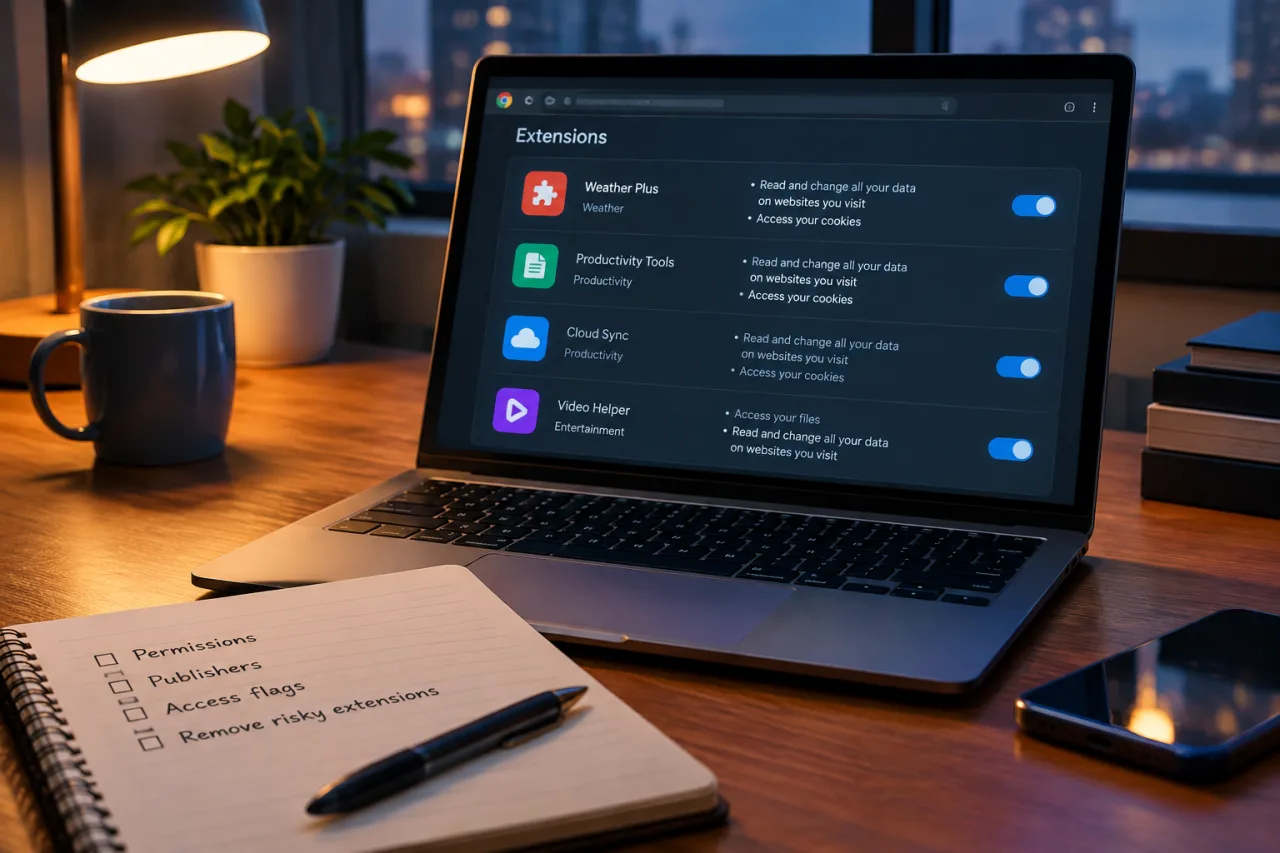
Extensions declare what they need in two buckets, exactly as Chrome’s developer documentation specifies: API permissions, a known list of strings, and host permissions, URL patterns that scope where those powers apply. Chrome documents the consequences plainly, and reading them once changes how you read every install prompt afterward.
| Grant on the card | What the extension can actually do |
|---|---|
| Read and change your data on all websites | Inject code into, and read page content from, every site you visit, from your email client to your bank portal |
| Read your browsing history | See every URL and its titles in your tab history, a full record of research, health searches and work projects |
| Read and change your cookies | Copy the session cookies that sign you in, the credential material of every logged-in site |
| Access incognito pages | Follow you into private windows, where you presumably log in to accounts you keep out of history |
| Access your USB devices / file URLs | Reach outside the browser sandbox into attached hardware or local files |
| Only the specific site listed | Scoped access, the healthy pattern most trustworthy single-site tools use |
The severity ladder is short. Broad host access plus cookie reading is the combination that defeats every defense that comes after it, because it does not need your passwords at all; the session itself is enough. Chrome’s documentation lists exactly which powers require host permissions: reading sensitive tab properties, injecting scripts, monitoring and controlling network requests, and accessing cookies through the cookies API. The audit’s job is to check which installed extensions hold those powers and whether each one still needs them.
The Ten-Minute Browser Extension Security Audit, Step by Step
Step 1: Open the Extensions Page and Make the List
Type chrome://extensions in the address bar and read every card top to bottom. Do not open the store first; the installed inventory is the audit’s subject. Write down, or sort by permission, every extension that shows “on all sites” or any broad host pattern. The count alone is usually the shock: machines used for a year carry ten or more extensions, most installed once during a task and never revisited.
Step 2: Vet Each Publisher and Its Story
Open the details panel for the ones you recognize as high-access. Check three facts against the store listing: does the developer’s name match a real company or known author, does the listed tool still match what you use it for, and does the install count and review history read organically. Extensions change owners, in any browser extension security review, ownership change is the moment risk arrives, which is exactly how a legitimate utility became a drainer in the 2026 campaign. If you cannot state in one sentence why an extension needs all-site access, it has failed the audit.
Step 3: Read the Update Date Against Your Memory
Extensions updated within the last few hours or days, while you were not installing anything new, deserve a second read of their latest changelog. Legitimate tools update on their own cadence with notes; the campaign pattern inserts the malicious version with no honest note. If an extension’s permissions list grew between versions you never approved, quarantine it immediately, because permission expansion is the tell the whole class of clean-update tricks leaves behind.
Step 4: Disable, Don’t Just Delete, the Doubtful Ones
Every card carries a toggle. Disabling keeps the quarantine reversible, removes the extension’s code execution path today, and gives you a clean week to notice whether you ever missed it. Deleted extensions are gone, which sounds right until you remember that a deleted extension’s browser data survives and that you lose the evidence trail if researchers later publish its identifiers. Disable first, delete later, in the same spirit as the first-hour containment our scam guides teach.
Step 5: Close the Two Silent Doors
On each suspicious card, open Details and check two manual doors Chrome leaves open by policy: “Allow in Incognito” and “Allow access to file URLs.” Both are off unless you switched them on, and both expand a tool’s reach beyond the browser’s normal visibility. Confirm they are off everywhere, because a clean, trusted extension holding incognito access reads exactly the windows you open precisely because you think they are hidden.
Why Clean History Is Not Safety: the 2026 Campaign, Decoded
The Socket campaign deserves its own section because it defeats the most common vetting logic: “it worked fine for a year.” Researchers found 14 extensions created outright by threat actors and 5 acquired from legitimate developers, spanning SEO stat checkers, crypto price monitors, screen search utilities and ad spying tools. Every one shipped its advertised functionality first, clean. Malicious behavior arrived later over the ordinary auto-update channel. Once the updates landed, the extensions stripped each page’s Content-Security-Policy headers with a dynamic rule, established a WebSocket channel with a five-minute heartbeat, and downloaded encrypted JavaScript modules that hid in hidden page elements.
The payload modules read like a menu of what broad access enables. Wallet modules hijacked the genuine “Connect Wallet” buttons on exchange and wallet sites, with named targets from MetaMask and Coinbase to Binance and Bybit. A seed-phrase module replaced the page on hardware wallet vendors, collecting recovery phrases through convincing fake update flows. Form-hook modules captured every keystroke across text, password and email fields on every page. And session riders read cookies and tokens directly from logged-in tabs. The flagship, a right-click and copy helper with about 70,000 Chrome users plus 10,000 on Edge, ran all of this while its icon looked as boring as ever. The lesson lands hard: the audit is not a one-time clean bill, it is a repeat ritual, because a tool that was honest in January can be hostile by August.
The Trust Scale: What 1.6 Million Installs Bought Nobody
Install counts are the least protective signal in the store ranking, and the ModHeader case proves it in one sentence. An extension with 1.6 million installs, one of the most trusted developer tools in professional use, was pulled from Chrome and Edge only after researchers raised the alarm. A large user base buys visibility from Google’s systems, not honesty from a publisher. The audit’s read is therefore inverted from store logic: installs tell you an extension is popular, never that it is safe, and the only durable trust signals are the permission scope you verified yourself and a publisher with a long stable identity and a reason to keep it.
The Repeat Ritual: Make the Audit Maintainable
A one-time cleanup fades; the browser extension security ritual is what stays. Three anchors make it effortless. Tie the audit to browser version updates, which happen roughly monthly, so the checklist rides a cadence that already exists rather than a memory discipline that never does. Tie the second anchor to installs themselves: any new extension earns a first audit within a day of installation, while its permissions are still small and its changelog empty. The third anchor is the quarterly deep pass, five minutes with a search of “all sites” permissions and a glance at every publisher name, run alongside the browser hardening routine we published in our browser zero-day update guide, so the browser’s patches and its extensions get reviewed together.
Layer the ritual into the wider stack rather than treating it as the stack. Session cookies are only as safe as the browser that holds them, so pair the audit with multi-factor authentication on every account, which our passkeys rollout guide covers for Philippine banks and wallets specifically, and with the periodic credential exposure check our infostealer guide walks for professionals. When MFA and passkeys carry the sign-ins, even an extension that copies cookies cannot cash them, which is how the layers multiply instead of repeating each other.
Browser Extension Security for Families and Remote Teams
Households and small teams run this audit slightly differently than solo professionals. For families, run it on the shared machine together, because school tools and game-adjacent helpers are the most common broad-access installs in that lane, and the conversation teaches the permission lesson better than any warning dialog. For teams, the audit belongs in the onboarding and offboarding routine of every remote hire, in the same slot where our password manager setup guide sits for logins: provision the approved tools, review them at exit, and treat unapproved store installs as a compliance matter rather than a preference. For both groups the browser extension security ritual is the same ten minutes; only the sign-offs change.
Frequently Asked Questions
How often should I run a browser extension security audit?
Run the full audit monthly, on the day your browser updates, a new install audit within a day of every new extension, and a deep quarterly pass for publisher changes. The 2026 clean-then-malicious update campaigns are the reason a once-a-year cleanup is not enough.
What is the danger sign on an extension’s permission card?
“Read and change your data on all websites” combined with cookie access is the most powerful and most abused pairing, followed by incognito and file access flags. Single-site host permissions are the healthy pattern to prefer where the tool allows it.
An extension I trust added new permissions after an update. What do I do?
Disable it immediately and look for a versioned changelog explaining the growth. Permission expansion without an honest note is the exact fingerprint of malicious update campaigns; re-enable only when the publisher documents the change and the audit clears the new scope.
Do malicious extensions show up in antivirus scans?
Rarely in time to matter. Extension code ships inside the browser’s own update channel and store packaging, so the audit is the catching layer; antivirus remains the layer for executables and downloads.
Is installing extensions only from the Chrome Web Store enough?
No. Every 2026 campaign example in this guide was in the official store, some for a long time, with thousands to millions of installs. The store filters some classes of abuse; only the audit reads what the extension is actually allowed to do on your pages.
My bank account was compromised with no password leak. Can an extension be the cause?
Yes, if the extension held session access. Cookie reading is logged-in-state theft without credentials, which is why banking sessions deserve their own browser profile where extensions are off, and why MFA remains the backstop that catches the rest.
- socket.dev/blog/chrome-edge-extension-wallet-drainer — their analysis of the extension wallet-drainer campaign
- developer.chrome.com/docs/extensions/develop/concepts/declare-permiss… — Chrome’s developer documentation specifies
External sources linked in this article, in order of first mention. Spotted an error or a broken link? Tell us.
Cite this pagePublished Nov 18, 2026
Agron, E. (2026, November 18). Browser Extension Security Audit: What Each Permission Really Exposes. WorldNgayon. https://worldngayon.com/browser-extension-security-audit/
Agron, Edmon. “Browser Extension Security Audit: What Each Permission Really Exposes.” WorldNgayon, 18 Nov. 2026, worldngayon.com/browser-extension-security-audit/.
Agron, Edmon. “Browser Extension Security Audit: What Each Permission Really Exposes.” WorldNgayon, November 18, 2026. https://worldngayon.com/browser-extension-security-audit/.
Agron, E. (2026) ‘Browser Extension Security Audit: What Each Permission Really Exposes’, WorldNgayon, 18 November. Available at: https://worldngayon.com/browser-extension-security-audit/.
E. Agron, “Browser Extension Security Audit: What Each Permission Really Exposes,” WorldNgayon, Nov. 18, 2026. [Online]. Available: https://worldngayon.com/browser-extension-security-audit/
@online{agron2026browserextension,
  author       = {Agron, Edmon},
  title        = {{Browser Extension Security Audit: What Each Permission Really Exposes}},
  year         = {2026},
  date         = {2026-11-18},
  organization = {WorldNgayon},
  url          = {https://worldngayon.com/browser-extension-security-audit/},
  urldate      = {}
}TY - ELEC AU - Agron, Edmon TI - Browser Extension Security Audit: What Each Permission Really Exposes T2 - WorldNgayon PY - 2026 DA - 2026/11/18/ UR - https://worldngayon.com/browser-extension-security-audit/ Y2 - ER -
Cite the version you read; the page may be updated. Zotero and Mendeley can also import this page directly.