
Table of Contents
Key Takeaway
- 🕊️ Platforms decide your online accounts by default if you never choose. Google offers data sharing after inactivity, Apple locks everything behind a legacy key, and Facebook freezes or memorializes, but only one of those outcomes is chosen by you.
- 🔑 Apple’s Legacy Contact system works, and it needs preparation. The person needs an access key you create plus your death certificate, and even then never sees your saved passwords.
- 🕯️ Facebook has two outcomes: a memorialized profile managed by one legacy contact, or full deletion after death. Without choosing one, your profile freezes with no one able to manage it.
- 💰 A GCash or Maya wallet balance is not a bank deposit. It carries no PDIC insurance; heirs claim it through the provider’s own documented process, while bank savings, including GSave and Maya Savings, follow the deposit claim path.
- 📋 Five settings, one document, one afternoon. Every platform in this guide lets you decide today who touches your online accounts when you cannot.
You have perhaps a hundred online accounts: mail, cloud photos, a social feed that holds a decade of family summers, a mobile wallet that doubles as your wallet in the market, savings in a digital bank, subscriptions, an online store, work logins. Almost none of them transfer when you die, because the contracts behind your online accounts are individual, private, and governed by each company’s own rules, not by the inheritance customs families assume will apply. Leaving your online accounts unplanned hands your family a search job during the worst possible week.
US estate lawyers wrote much of what exists online about this subject. This guide does the practical layer Philippine families actually ask: what each major platform does after death, what heirs must prepare, which balances are insured and which are not, and the five settings that settle the matter in one sitting. For the legal layer around inheritance itself, our estate planning guide for OFWs covers wills and the succession process; this piece covers the account-by-account mechanics that guide cannot reach.
The Three Ways Platforms Handle Death
Despite the differences in branding, your online accounts fall into one of three designs, and your preparation differs for each.
- Data-sharing tools. Some providers, Google most prominently, let you name trusted people who receive your data after a period you choose. No estate process is involved; the tool shares what you instructed.
- Claim processes. Money platforms do the opposite: nobody gets access by design. Heirs file a documented claim, and the provider moves or closes the balance after verifying documents. This is the route for wallets, banks, and telecoms.
- Memorialization. Social platforms freeze the account as a place of memory, with the word Remembering next to the name, and optionally allow one chosen person to manage the frozen profile.
The expensive mistakes happen when families assume all three work the same way. A password list helps the data tools, but it cannot replace a death certificate where claims are involved, and it opens doors on platforms the deceased never intended anyone to open. The table below compresses the choices this guide unpacks.
| Platform | What happens after death | The setting to leave alive |
|---|---|---|
| Your inactive plan shares data with up to 10 people, or family files the deceased-user request to close it | Inactive Account Manager | |
| Apple | Legacy Contact with access key and death certificate; a three-year access window | Legacy Contact in Settings |
| Profile memorialized, with one legacy contact managing it, or deleted if you chose that | Memorialization in Accounts Center | |
| GCash wallet | Heirs file an in-app support ticket; funds move to a verified account; no PDIC insurance on the wallet itself | Verified profile plus accessible claim documents |
| Bank deposits, including GSave and Maya Savings | Standard estate claim; PDIC insurance up to 1 million pesos per depositor per bank applies to eligible deposits | Locatable bank statements |
Google: Write the Plan Before It Is Needed
Google’s Inactive Account Manager, documented in Google’s account help, is the oldest and most generous of the major data-sharing tools. You choose an inactivity period from a few months to 18 months, you choose what triggers count as activity, and you choose what happens when the timer runs out: notify people, share data with them, or both.
- Up to 10 trusted contacts can be named, and you can share different data with different people: photos to the eldest child, work mail to a partner, nothing at all to anyone else.
- Share or notify only. A contact can receive an automatic email you wrote in advance, a bundle of selected data, or both. Google verifies the trusted contact through a phone number before any data leaves.
- You can also choose auto-delete. If you prefer that nothing is shared, the tool deletes the account instead, and Google states clearly which products that affects.
- The claims route also exists. Immediate family members and representatives can submit a request regarding a deceased user’s account to close an account, when there is no prepared plan or the family needs closure for security reasons.
The Inactive Account Manager is not a will substitute on the money side. It shares data, and data is not access: a family member who receives a Gmail archive cannot log into the Gmail account itself. What it does is rescue the photographs, the documents, and the writing that live behind Google’s walls.
Apple: Deliberate Access, Deliberately Narrow
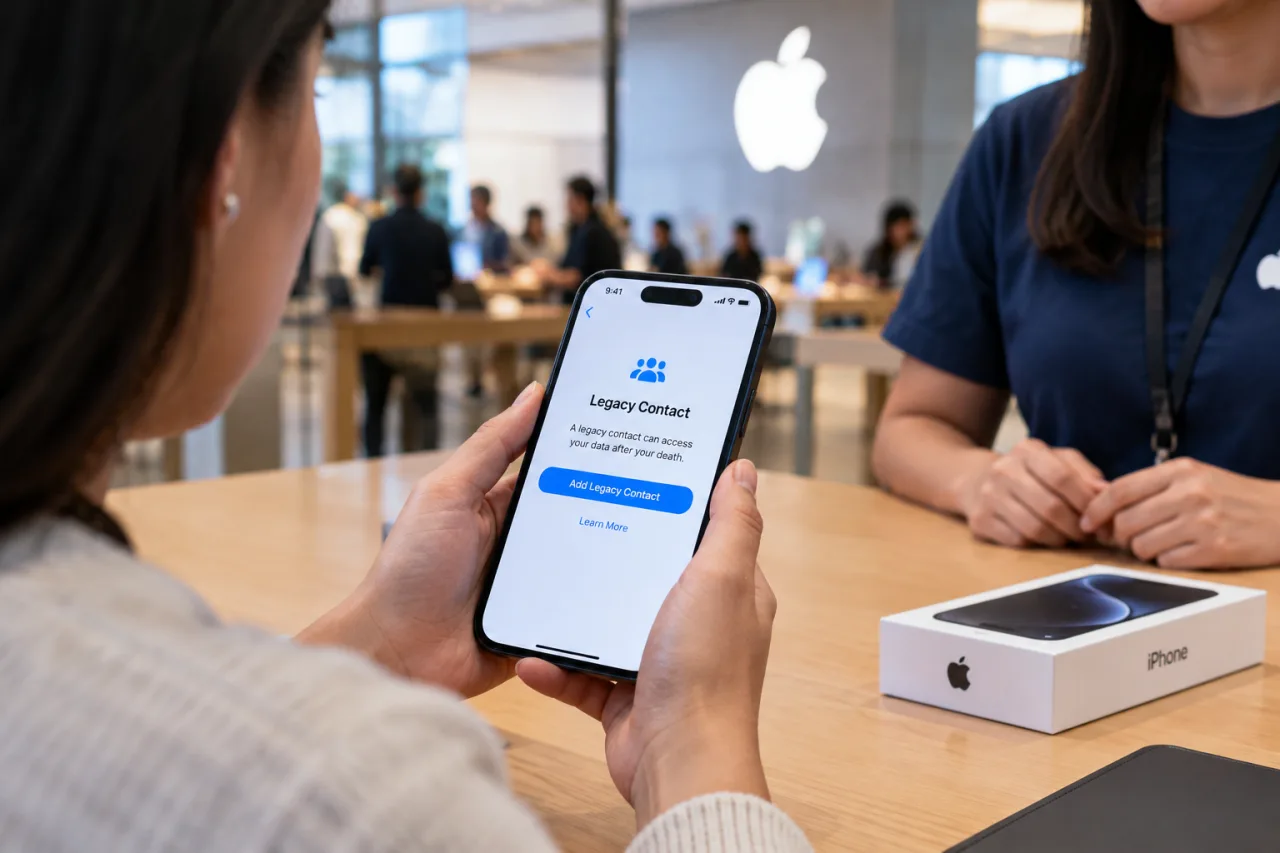
Apple chose the opposite design. Since iOS 15.2, every Apple account holder can name one or more Legacy Contacts through Settings, and Apple documents the system plainly in its Legacy Contact support pages.
- The access key is the heart of it. When you add a legacy contact, you generate a key and hand it over by message or print. After your death, the contact needs that key plus your death certificate to request access, and Apple verifies both before anything moves.
- Access is temporary and broad. Once approved, the contact receives a special account and three years of access to photos, messages, notes, files, contacts, and device backups, with time to download everything.
- It is deliberately narrow on secrets. iCloud Keychain contents, which include saved passwords, payment information, and passkeys, are excluded. Licensed movies, music, and books attached to the account are also excluded.
- Multiple contacts are allowed, and any one of them can act, including deleting the account permanently. Choose people who can disagree without deadlock.
For Filipino families, the access key detail matters most: a legacy contact without the key has no way in, and Apple will not reissue it. Hand it to trusted family members now, or store it where your executor knows to look, because the same Apple documentation warns that the key must also be re-entered for end-to-end encrypted data such as health records.
Facebook: Memorialize It, Manage It, or Delete It
Meta’s design is the memorial. A memorialized account shows Remembering beside the name, keeps existing content visible to the audience it was shared with, drops the profile from public suggestions and birthday reminders, and allows no one to log into it. This design, documented in Meta’s memorialized accounts help pages, has one lever you should still pull in advance: naming a legacy contact.
- A legacy contact can manage the memorialized profile. They can pin a final post, update the profile and cover photos, accept or decline new friend requests, and delete the account entirely if the family decides that later.
- You may also grant download permission so the legacy contact can keep a copy of what you shared while the memorialization stands.
- Only one legacy contact is allowed, and only from your Facebook friends. If you would rather the profile vanish, the alternative is selecting delete-after-death in Account ownership and control in the Accounts Center.
- No changes are possible on a memorialized profile that has no legacy contact. That frozen state is the default for everyone who leaves this part of their online accounts unplanned.
For OFW families whose OFW social accounts are also business pages or community groups, note Meta’s separate rule: a Page with a sole admin whose profile is memorialized can be removed after a valid request. Add a second admin to anything that must survive you, a step that protects the page from ordinary account loss too.
The Online Accounts That Hold Money
Data platforms decide between sharing and memorializing. The money side of your online accounts never shares: those platforms run claim processes, and the differences between them decide how fast your family sees a peso again.
- Your GCash wallet is not a deposit. GCash’s own terms state the wallet is a reloadable e-money instrument, not a deposit account, and not covered by the Philippine Deposit Insurance Corporation. What protects the wallet balance is the issuer’s obligation to safeguard customer funds under Bangko Sentral rules, enforced through supervision rather than an insurance claim.
- Heirs claim a deceased GCash owner’s balance through an in-app ticket. The documented flow: the family creates or fully verifies the claimant’s account, then files a support ticket with the transfer request and the required documents, including the death certificate and proof of heirship, and the funds move to the verified account.
- Bank savings work differently. A traditional bank balance or a digital-bank savings product is a deposit, insured by PDIC up to 1 million pesos per depositor per bank as of March 2025, and claimed through the estate’s documents rather than an app ticket.
- Sweep what should count as savings. Money parked idle in a wallet keeps no insurance. If a balance is genuinely savings, move it to the savings account, where the deposit insurance and the formal claim path both live. The habit costs two minutes and speeds your family’s claim.
The estate layer that sits under all of these is the succession process: banks release a deceased customer’s funds through the estate’s settlement documents, and the tax rules around inheritance are handled with the Bureau of Internal Revenue. That territory, from extrajudicial settlement to estate tax, is what our OFW estate planning guide walks through properly. The social-benefit layer also matters: SSS death and funeral claims follow their own documented route, covered in our guide to the SSS claims an OFW can file.
When Someone Has Already Died: the First Week
If you are reading this after a loss, the online accounts left behind are handled in a narrower and calmer order than the panic suggests.
- Get several certified copies of the death certificate. Every claim in this guide, from Apple’s legacy request to a wallet ticket, consumes one.
- Look before you break. If the deceased prepared the settings above, the platform routes do the work, and no password guessing is needed. If you find none, use the deceased-user and claim forms rather than trying logins, because successful unauthorized logins create ownership and privacy problems that outlast grief.
- File claims one at a time, with the same folder. The wallet ticket, the bank claim, Google’s request form, and the SSS funeral claim each list their documents on their official pages, and the same certified set serves all of them.
- Pay nobody who offers to recover an account by other means. Messages that promise account access for a fee, in the week after someone dies, are fraud aimed at grief. Report them, and see our guide to account recovery through official channels for what the legitimate process looks like.
Set It Today: the Five Settings
Every reader can finish this list in one sitting, and each step is free of charge.
- Set up Google’s Inactive Account Manager. Choose your inactivity period, name your contacts, decide what each receives, and record what you decided.
- Add your Apple Legacy Contacts and hand them the access key. One key per contact, and the key is useless at a funeral if you never gave it away first.
- Choose Facebook’s door: a legacy contact or delete-after-death. If your profile anchors a business Page, add a surviving admin today.
- Give your password manager’s emergency access to one person. A trusted contact in the vault, and the passwords to your online accounts outlive the phone that holds the vault app, though this still never replaces the platform claims above.
- Write the one-page inventory. A simple list: provider, purpose, whether money lives there, and who handles it. Print it or encrypt it, and tell exactly one person where it is. Store backups of the family photos by the 3-2-1 backup rule, because death is not the only way data disappears.
Your online accounts hold the modern equivalent of the family photo box, the market wallet, and the mail stack on the table. The platforms have prepared routes for the worst day, and those routes only work when someone chose, in advance, to leave them open. Decide this weekend, write down this weekend, and your family inherits your online accounts as instructions instead of puzzles.
FAQ
What happens to a deceased person’s Google account?
If the person set up Google’s Inactive Account Manager, the planned data sharing or notifications trigger after the chosen inactivity period. If there is no plan, immediate family members and representatives can submit Google’s deceased-user request form to have the account closed, with documentation.
Can my family access my Apple account after I die?
Only through the Legacy Contact system. You must add them as a legacy contact while alive, and they must hold the access key you generated plus your death certificate. Apple then approves a special legacy account with temporary access to data such as photos, messages, and backups, while saved passwords and Keychain contents stay out of reach.
What happens to a GCash account when the owner dies?
The heirs file the documented claim: fully verify the claimant’s own account, then submit a ticket to GCash’s help center requesting the transfer of the funds, attaching the death certificate and proof of heirship. Approved funds move to the verified account. The wallet balance itself is e-money, not a PDIC-insured deposit.
How do I prepare my online accounts for death?
In one sitting: set Google’s Inactive Account Manager, add Apple Legacy Contacts and share the access keys, choose Facebook’s memorialization option with a legacy contact or delete-after-death, give your password manager’s emergency access to one trusted person, and write a one-page inventory telling someone where it is.
Is my GCash or Maya balance insured like a bank deposit?
The plain wallet balance is not. It is e-money issued under Bangko Sentral supervision, safeguarded but not deposit-insured. Savings products that are actually bank accounts, such as GSave through a partner bank or Maya Savings through Maya Bank, are PDIC-insured up to 1 million pesos per depositor per bank, which is why moving real savings out of the wallet matters.
What is account memorialization on Facebook?
Meta’s status for a deceased person’s profile: the account is frozen, shows Remembering beside the name, and no one can log into it. If the owner named a legacy contact, that person can manage the profile, pin posts, and even delete it. Without a legacy contact, nothing can be changed, which is why choosing one in advance is the entire decision.
Financial Disclaimer
WorldNgayon publishes insurance and claim information for general guidance only. Platform rules, claim requirements, and insurance coverage change; verify every figure on the official pages linked above before making a claim. Nothing in this article is financial or legal advice.
- support.google.com/accounts/answer/3036546 — Google’s account help
- support.google.com/accounts/troubleshooter/6357590 — request regarding a deceased user’s account
- support.apple.com/en-us/102631 — Legacy Contact support pages
External sources linked in this article, in order of first mention. Spotted an error or a broken link? Tell us.
Cite this pagePublished Nov 15, 2026
Agron, E. (2026, November 15). What Happens to Your Online Accounts When You Die (and How to Prepare Yours). WorldNgayon. https://worldngayon.com/online-accounts-when-you-die/
Agron, Edmon. “What Happens to Your Online Accounts When You Die (and How to Prepare Yours).” WorldNgayon, 15 Nov. 2026, worldngayon.com/online-accounts-when-you-die/.
Agron, Edmon. “What Happens to Your Online Accounts When You Die (and How to Prepare Yours).” WorldNgayon, November 15, 2026. https://worldngayon.com/online-accounts-when-you-die/.
Agron, E. (2026) ‘What Happens to Your Online Accounts When You Die (and How to Prepare Yours)’, WorldNgayon, 15 November. Available at: https://worldngayon.com/online-accounts-when-you-die/.
E. Agron, “What Happens to Your Online Accounts When You Die (and How to Prepare Yours),” WorldNgayon, Nov. 15, 2026. [Online]. Available: https://worldngayon.com/online-accounts-when-you-die/
@online{agron2026onlineaccounts,
  author       = {Agron, Edmon},
  title        = {{What Happens to Your Online Accounts When You Die (and How to Prepare Yours)}},
  year         = {2026},
  date         = {2026-11-15},
  organization = {WorldNgayon},
  url          = {https://worldngayon.com/online-accounts-when-you-die/},
  urldate      = {}
}TY - ELEC AU - Agron, Edmon TI - What Happens to Your Online Accounts When You Die (and How to Prepare Yours) T2 - WorldNgayon PY - 2026 DA - 2026/11/15/ UR - https://worldngayon.com/online-accounts-when-you-die/ Y2 - ER -
Cite the version you read; the page may be updated. Zotero and Mendeley can also import this page directly.