Key Takeaway
- 🎒 A travel cybersecurity kit is no longer optional: hotel and airport networks are shared spaces where your banking sessions, work emails, and family photos move through equipment you do not control.
- 📶 The core piece is a VPN — it encrypts every packet on hostile networks, turning an open WiFi into a private tunnel regardless of who else is on it.
- 🔋 Juice-jacking defense costs nothing: carry your own cable and a power bank, and never plug into unknown USB ports — data lines stay yours.
- 📱 eSIM discipline beats roaming scams: a prepaid travel eSIM keeps your PH number safe from SIM-swap abuse while you’re abroad.
- 🧳 Seven pieces total, most of them free or already on your phone — the kit is habits plus one subscription, not a shopping spree.
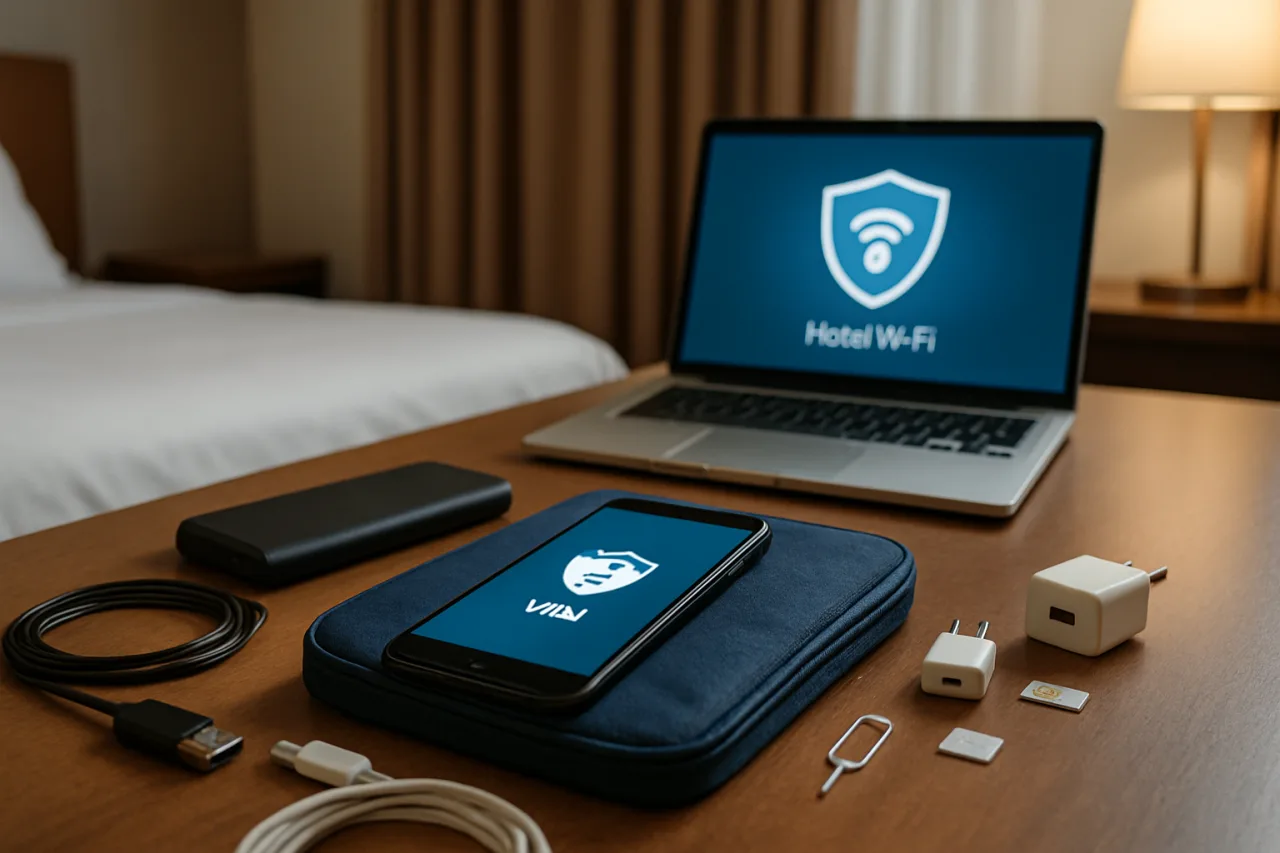
Check in, drop the bag, find the WiFi password on the room card, connect, start video-calling home. That ritual happens in millions of hotel rooms every night — and it happens over a network every other guest shares, configured by people you have never met, monitored by equipment you have never audited. A travel cybersecurity kit is the modern answer: a compact set of tools and habits that makes the same trip safe by default. This travel cybersecurity kit guide packs the seven essentials — from the encryption layer that fixes hostile WiFi to the eSIM discipline that protects your Philippine number — sized for OFW realities: airport layovers, worker dormitories, and remittance check-ins from forty countries.
Table of Contents
Why Travel Is the Most Dangerous Computing You Do
At home, your traffic crosses your own router, your own ISP, and devices you chose. On the road, every one of those guarantees disappears. The 549 million public hotspots worldwide documented by industry trackers are shared broadcast spaces; the hotel network is a switch you cannot inspect, serving strangers whose laptops may be infected and whose intentions may include watching the traffic. Airport WiFi adds the crowd: hundreds of devices on one network, many owned by people who just flew through cities where infostealer malware is a cottage industry.
The stakes for OFWs are heavier than for tourists: the phone holds banking apps, remittance tools, work credentials, and the family’s financial lifeline. The attacks travel with the network — evil-twin hotspots that impersonate the hotel’s SSID, captive-portal harvesting pages that phish email logins, and the session-sniffing that old-style open networks still permit. None of this requires movie-hacker skill; the tooling is commodity and the victims are chosen by convenience.
Piece 1: A VPN — the Encryption Layer That Fixes Hostile WiFi
The single tool that neutralizes every shared-network threat is the VPN: it wraps all your device’s traffic in an encrypted tunnel before the hostile network ever sees a byte. On a VPN-protected device, the hotel’s switch, the airport’s access point, and any evil twin broadcasting the same name all become dumb pipes — they can carry your encrypted packets, but cannot read, modify, or inject into them.
This is where the travel cybersecurity kit earns its name. A VPN like NordVPN runs on all your devices simultaneously, so the phone doing remittance checks and the laptop sending work files share the same protection. Set it to connect automatically on untrusted WiFi — the feature exists precisely so you never have to remember in an airport queue. One tap on arrival in a new country, and every network between you and home becomes private. The honest note every traveler should hear: a VPN is not a license for carelessness — it removes the network threat layer while your passwords, OTPs, and judgment handle the rest of this kit.
Related: Hardware Wallet Security: 7 Proven Steps for the Cold Storage Buyer Shield
Related: Singapore Cyber Landscape 2025/2026: The Infection Spike Behind the Sc
Affiliate disclosure: WorldNgayon may earn a small commission when you use our links, at no extra cost to you. Full details on our disclaimer page.
Piece 2: Threat Protection — the Malware Filter on the Same Tunnel
Modern travel risk is not only interception; it is infection. You will browse unfamiliar sites, download tickets and maps, and click links from booking confirmations on the road. The newer VPN subscriptions fold a malware-filter layer into the same app: URLs get checked against threat databases, tracked telemetry gets stripped, and infected downloads get blocked before they land. NordVPN’s next-gen antivirus-class threat protection runs this scan locally, on-device, meaning even your mobile data traffic gets the same filtering your VPN tunnel does.
For the traveler assembling a travel cybersecurity kit, the division of labor is clean: the tunnel protects who might be watching; the filter protects what might be infecting. Together they cover the two attack surfaces a travel day actually produces — hostile networks and hostile links.
Piece 3: Your Own Cable and Power Bank — Juice-Jacking Defense
Public charging stations share a dirty secret: USB carries data as well as power. Juice-jacking — the implantation of malware or data copying through a compromised charging port or cable — remains rare per the security community’s consensus, but the defense costs almost nothing: carry your own cable (power-only or from a trusted source), carry a power bank charged at home, and treat airport USB ports as the last resort they are. The AC wall adapter is data-blind; the USB port is not. For the OFW whose phone is the bank, the ₱500 power bank is the cheapest insurance in the travel cybersecurity kit.
Piece 4: A Travel eSIM — the Roaming and SIM-Swap Shield
Two problems, one tool. First, connectivity: a prepaid travel eSIM activates data the moment you land, so you never camp on the airport’s open network out of desperation. Second, and less obvious: when your Philippine SIM stays dormant in a drawer while you travel, it still carries the OTPs for every account that trusts your number — and dormant numbers abroad are the classic SIM-swap window documented in our SIM swap guide. The travel cybersecurity kit move for SIMs: keep the PH SIM active and receiving (roaming or WiFi-calling), and add a data eSIM for the country — the number stays protected, the connectivity stays cheap, and the two functions stop sharing one fragile card.
Piece 5: Password Manager and Two-Factor Apps
Travel multiplies logins: airline portals, hotel WiFi pages, booking apps, new WiFi networks. This is precisely when reused passwords meet phishing-shaped captive portals. The travel cybersecurity kit pieces here: a password manager generating unique credentials (the password checklist guide covers the audit), offline access enabled before departure, and authenticator apps — not SMS — carrying your two-factor codes. SMS 2FA dies with roaming signals and SIM swaps; authenticator apps travel in your pocket. The passkey migration in our passkeys guide is the long-term upgrade here.
Piece 6: Device Hygiene Before Departure — the Pre-Flight Checklist
The night before the flight, run the sixty-minute pre-flight: security patch current (September update guide), apps only from official stores, Accessibility permissions audited (trojan guide), screen lock with biometrics enabled, banking apps set to require biometric re-authentication, VPN installed with auto-connect armed, offline maps and boarding passes downloaded, and a backup of the phone completed at home. Travel is not the time to discover an unpatched device — the pre-flight checklist is what turns your phone into the hardened core the rest of the travel cybersecurity kit assumes.
Piece 7: The Come-Home Ritual — Decontamination
The trip ends; the hygiene does not. The come-home ritual: review account logins and revoke any sessions created abroad, scan the devices you traveled with, change any password you typed on a network you did not trust, and review bank and e-wallet statements for the trip window — the push alerts from our banking safety guide make this a five-minute glance. If anything looks wrong, the reporting-first-hour rule applies from our OFW banking guide. Decontamination closes the travel cybersecurity kit’s loop: what went out protected comes home verified.
Frequently Asked Questions
What is a travel cybersecurity kit?
A travel cybersecurity kit is the set of tools and habits that keeps your devices safe on unfamiliar networks: a VPN for encrypted traffic, threat filtering against infected downloads, your own charging cable and power bank, a travel eSIM, a password manager with authenticator apps, a pre-flight device check, and a come-home decontamination ritual. Seven pieces, most free or already built into your phone.
Is hotel WiFi safe for banking?
Hotel WiFi is a shared network you cannot audit — safe enough for browsing, never the right place for banking on an unprotected device. The kit answer: verify the official network name with reception, then connect with a VPN so the shared switch sees only encrypted traffic. With the tunnel up, the banking session is protected regardless of who else shares the network.
Do I really need a VPN while traveling?
Yes — it is the one piece that fixes an entire threat class (network interception, evil twins, session sniffing) that no other tool addresses. The auto-connect feature makes it effort-free: the tunnel arms itself whenever you leave trusted WiFi. For OFWs whose phones carry banking and remittance apps, the VPN is the kit’s non-negotiable core.
What is juice jacking and how do I avoid it?
Juice jacking is data theft or malware implantation through a compromised USB charging port or cable. The defense is simple: carry your own cable and power bank, prefer AC wall adapters (power-only, no data pins), and use public USB ports only as a last resort. The security community rates the real-world risk as low-frequency, but the protection costs less than a meal.
Should I turn off my Philippine SIM while abroad?
No — keep it active, because it receives the OTPs your accounts trust, and a number that stops answering is the SIM-swap window. Instead, add a prepaid travel eSIM for data: the PH number stays live for verification codes while the eSIM carries cheap local connectivity. Both functions stop depending on one card.
What should I do right after returning home?
Run the come-home ritual: revoke travel-window sessions on critical accounts, scan the devices you carried, change any password typed on untrusted networks, and review bank and e-wallet statements for the trip dates. It takes ten minutes and catches what the trip exposed — the same first-hour reporting discipline applies if anything looks wrong.
Final Word: Pack the Tunnel, Not the Fear
Travel was always the most dangerous computing you do — hostile networks, borrowed charging ports, logins typed in queues. The travel cybersecurity kit turns that exposure into a solved problem: encryption for the networks, filtering for the links, discipline for the ports, redundancy for the SIM, and rituals for the margins. Seven pieces, an hour of setup, and one subscription at the core — then the only thing you pack heavier than luggage is protection. Fly safe; the kit flies with you.
Cite this pagePublished Sept 19, 2026 · Updated Oct 17, 2026
Agron, E. (2026, September 19). Hotel WiFi Is a Shared Office With Strangers. Pack the Kit That Fixes It. WorldNgayon. https://worldngayon.com/travel-cybersecurity-kit-2026/
Agron, Edmon. “Hotel WiFi Is a Shared Office With Strangers. Pack the Kit That Fixes It.” WorldNgayon, 19 Sept. 2026, worldngayon.com/travel-cybersecurity-kit-2026/.
Agron, Edmon. “Hotel WiFi Is a Shared Office With Strangers. Pack the Kit That Fixes It.” WorldNgayon, September 19, 2026. https://worldngayon.com/travel-cybersecurity-kit-2026/.
Agron, E. (2026) ‘Hotel WiFi Is a Shared Office With Strangers. Pack the Kit That Fixes It’, WorldNgayon, 19 September. Available at: https://worldngayon.com/travel-cybersecurity-kit-2026/.
E. Agron, “Hotel WiFi Is a Shared Office With Strangers. Pack the Kit That Fixes It,” WorldNgayon, Sept. 19, 2026. [Online]. Available: https://worldngayon.com/travel-cybersecurity-kit-2026/
@online{agron2026travelcybersecurity,
  author       = {Agron, Edmon},
  title        = {{Hotel WiFi Is a Shared Office With Strangers. Pack the Kit That Fixes It}},
  year         = {2026},
  date         = {2026-09-19},
  organization = {WorldNgayon},
  url          = {https://worldngayon.com/travel-cybersecurity-kit-2026/},
  urldate      = {}
}TY - ELEC AU - Agron, Edmon TI - Hotel WiFi Is a Shared Office With Strangers. Pack the Kit That Fixes It T2 - WorldNgayon PY - 2026 DA - 2026/09/19/ UR - https://worldngayon.com/travel-cybersecurity-kit-2026/ Y2 - ER -
Cite the version you read; the page may be updated. Zotero and Mendeley can also import this page directly.