Key Takeaway
- 📱 Maya ID-less verification lets eligible users upgrade accounts with name, birthday, and a video selfie — no ID photo or upload.
- 🪪 The check runs against National ID eVerify, the Philippine Statistics Authority’s identity service — the details you already know do the proving.
- 🔓 An upgraded account raises limits (upgraded accounts carry higher caps than the ₱50,000 basic wallet) and unlocks savings, credit, and the full bank feature set.
- 🛡️ If eVerify cannot match your details, the app falls back to the regular ID-upload flow — nothing is lost, and the safeguard layers stay on.
- 🏦 Maya announced the capability September 3 and rolled it out this month, as the BSP proposes National ID integration for customer due diligence across supervised institutions.
There is a specific Filipino frustration that the Maya ID-less verification rollout finally addresses: the wallet upgrade abandoned halfway because the one valid ID in the house was in a drawer, expired, or with a family member in the province.
A basic Maya account caps incoming transactions at ₱50,000 and sits at the edge of what daily life needs; the upgraded account — with its higher limits, savings features, and credit options — sat behind a KYC wall that demanded a photographed ID.
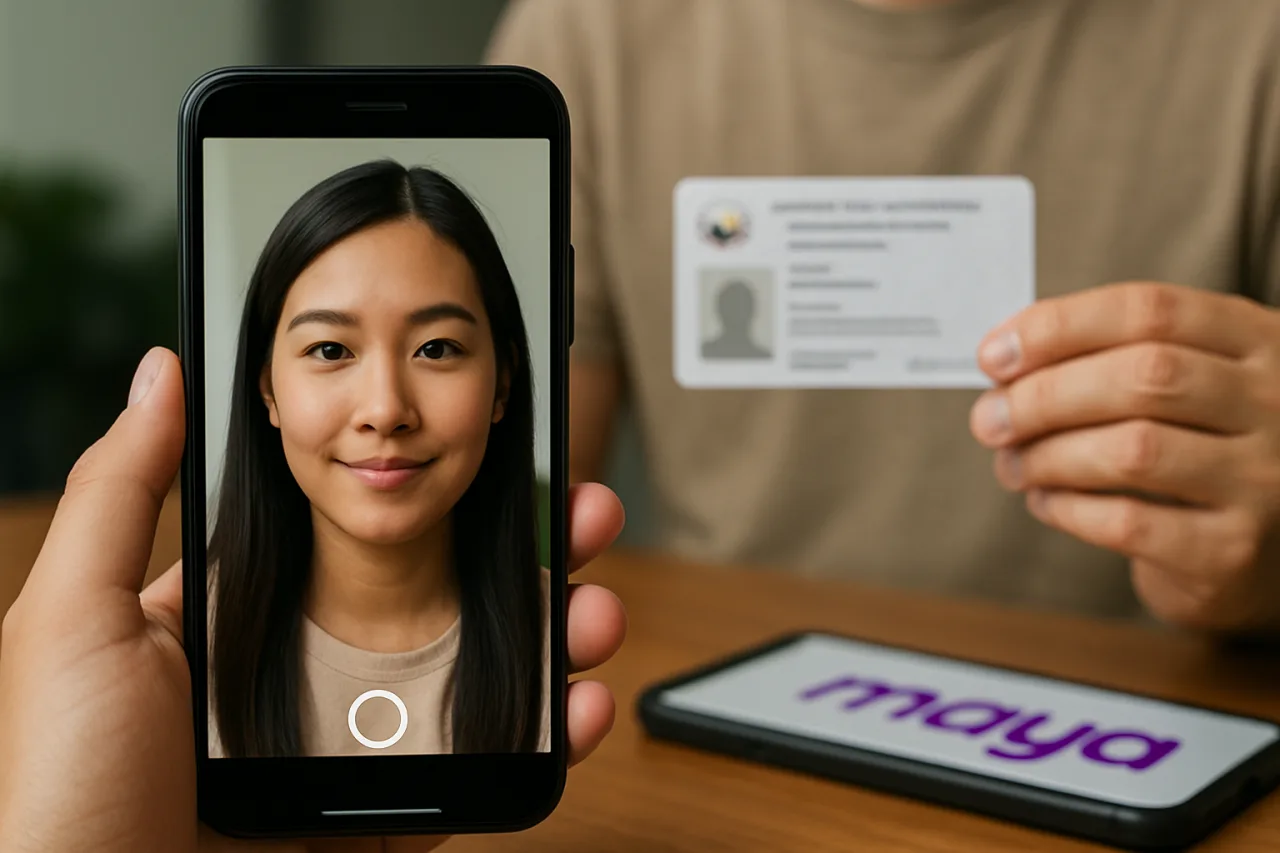
Maya’s September 3 announcement, and the rollout coverage that followed through mid-September, removed that wall for eligible users: verify with your name, your birthday, and a quick video selfie, checked against the government’s own identity system, with no physical ID photographed or uploaded anywhere.
Table of Contents
How the Flow Works — Three Steps
Step one: when the upgrade prompts for identity, enter the details you already know — your name and birthday — or your National ID number if you have it memorized or saved. Maya checks these against your National ID records through National ID eVerify, the PSA’s identity-verification service.
This is the step that replaces the ID photo: the government’s own record does the confirming. Step two: take a quick video selfie — the liveness-and-face check that ties the person holding the phone to the record being verified. Step three: fill in only what is missing.
The system asks nothing that eVerify already confirmed, so the form shrinks to whatever gaps remain.
That is the whole flow. No digging through a wallet, no photographing a card under bad room lighting, no upload-wait-resubmit cycle that kills half of all upgrade attempts.
And the failure path is humane: if National ID eVerify cannot match your details — a name mismatch, a record not yet in the system — you continue through the regular ID-upload process without starting over.
Why National ID eVerify Changes the Math
The upgrade friction was never the app’s fault — it was the cost of proving identity in a country where millions of valid identities exist only as paper records.
National ID eVerify inverts the burden: instead of the user photographing a document that the bank must then verify, the bank queries the government’s authoritative record directly and the user simply corroborates it live with a face match.
The user provides less data than before — no ID number photographed, no card images floating in a gallery — and the verification gets stronger, because the source is the national registry rather than a photo of a card.
The timing is not accidental. The Bangko Sentral ng Pilipinas has proposed requiring supervised financial institutions to integrate with National ID authentication services for customer due diligence — Maya’s September announcement of National ID verification “at scale,” paired with responsible-AI framing, positions the country’s largest digital bank app ahead of exactly that direction.
The e-wallet that feels lighter to upgrade is also the one whose verification is moving toward where regulation is going.
What the Upgrade Unlocks — the Limits Table
Maya’s own structure shows why the upgrade matters in pesos.
A basic account carries a ₱50,000 incoming-transaction cap; upgraded accounts carry materially higher caps (Maya’s published tiers run to ₱100,000 and above, with the bank-grade features opening at the upgraded level) — and beyond the caps, the upgraded account is what opens the savings account, the credit line, and the full card experience.
For an OFW family using Maya as the remittance landing point, the basic-account cap is the binding constraint on exactly the transfers that matter most; the upgrade removes it.
The upgrade is free — and Maya says outright that its representatives will never ask for your password, your 16-digit card number, or an OTP, nor charge you to upgrade.
That warning matters precisely because a smoother official process always breeds a fake version of itself: any “Maya upgrader” asking for your OTP is a scammer, full stop. The legitimate flow is entirely in-app, self-service, and costs nothing but a video selfie.
The Security Fine Print Worth Reading
The lighter user experience does not mean lighter checks. Maya still performs the applicable identity verification, screening, and regulatory checks behind the scenes; AI and automation handle routine verification work, while cases needing closer attention route to human review.
The video selfie is not theater — it is the liveness-and-ownership check that ties the live person to the eVerify record, the same layered identity approach the app applies to every login. Users should expect the occasional handoff to manual review and read it as the system working, not failing.
For the privacy-minded, the design answer is worth appreciating: the ID-less flow shares less with the app than the ID-photo flow did — no card image, no photographed address — while verifying against the source of truth. The information you type is what you already know by heart; the government already holds the rest.
Who Is Eligible — and Who Falls Back
Maya frames the flow for eligible users — those whose details exist and match in the National ID registry. In practice that means users whose PSA record is current: citizens registered under the national ID system with consistent name and birthdate records.
If your PSA record carries a different name ordering, an unrecorded correction, or a pending amendment, eVerify may not match — and the fallback is the ordinary upgrade: the ID list (Philippine National ID, ePhilID, digitized SSS ID, passport, driver’s license, UMID, and more), the video selfie, and the standard review.
Either path reaches the same upgraded account; ID-less simply removes the queue for the majority whose records are clean.
Minors’ accounts and Maya Business upgrades run on their own requirement sets — passport or school ID plus guardian consent for the 7-17 cohort, and business-document verification for the Business product — so the ID-less flow’s promise applies to the personal adult upgrade, which is where the volume and the frustration lived.
The BSP Direction: Where This Is All Heading
Zoom out and the significance is bigger than one app feature. The Philippines has spent a decade building the National ID, and the hard part was never the card — it was making the registry usable at the moment of a financial transaction.
eVerify is that usability arriving at scale: a regulated institution querying the authoritative identity source in real time, with the user’s consent, inside a phone flow measured in seconds. The BSP’s proposal to make such integration a due-diligence standard would extend the same spine to every supervised institution.
The user-visible result: KYC that used to be a branch visit with photocopied IDs becomes a name, a birthday, and a face — and the security paradox resolves, because the strongest verification is the one that checks the government’s record rather than trusting a photo.
For the OFW household, the practical translation is straightforward: the money app your family uses gets its full powers without a trip to reproduce documents.
The upgrade that used to wait for a visit home now happens from Riyadh on a lunch break — Name, birthday, video selfie, done — and the remittance plan never waits on a laminated card again. The queue that died this month was never about technology; it was about whose record the system trusted.
It trusts the registry now, and the registry trusts you.
The OFW Family Upgrade: Why the Remote KYC Matters Most Abroad
The upgrade wall bit hardest where the family needed the wallet most. Consider the standard OFW arrangement: the worker sends to a family Maya account; the basic-account cap of ₱50,000 incoming works for a monthly remittance but breaks on tuition season, hospital episodes, or the December double-send.
The upgrade raises the ceiling — but the old flow assumed a physical ID could be photographed “now.” For the member abroad, “now” meant waiting for a home visit or mailing an ID — risks no remittance plan should carry.
ID-less verification moves the whole KYC act into the phone that is already in Riyadh, Dubai, or Hong Kong: the OFW completes the upgrade on a break, the family’s receiving account lifts its ceiling the same day, and the December crush meets a wallet ready for it.
The same logic covers the account-opening half of the diaspora economy. Many OFWs keep a Philippine number and a Philippine SIM dormant between contracts; identity apps that depend on SMS to a dormant SIM lock those users out.
Name-birthday-eVerify plus selfie works anywhere the phone works — the verification follows the person, not the paperwork drawer in Laguna.
The Fintech Competitive Read: Why Maya Moved First
The competitive layer is worth naming because it explains the speed. Maya Bank and Maya Philippines hold the digital-bank licenses and the scale — the country’s most-used banking app — and the BSP has signaled that National ID integration is becoming the compliance standard.
Moving first converts a regulatory direction into a product advantage: every user who upgrades through eVerify is a fully-KYCed bank customer acquired without branch cost, and the competitor institutions will follow the same spine because the regulator is proposing exactly that integration.
The user wins either way — the upgrade queue shrinks industry-wide — but the first mover banks the trust that comes from being the app that “already did this.”
For users comparing wallets, the useful question is no longer “which app has the feature” but “whose record matches the registry” — because the ID-less upgrade runs on registry consistency, the fintech race now quietly depends on PSA data quality.
The household with a clean PSA record upgrades everywhere in minutes; the household with a pending PSA correction has one more reason to fix the record this year, because every regulated wallet will soon query it.
Frequently Asked Questions
What is Maya ID-less verification?
An account-upgrade flow for eligible users that verifies identity through National ID eVerify plus a video selfie — no photo or upload of a physical ID.
What details do I need to start?
Your name and birthday as they appear in the National ID registry, or your National ID number if you have it memorized — plus a short video selfie.
What if eVerify cannot verify me?
You continue with the regular ID-upload upgrade process without starting over; the app supports both paths.
Is the upgrade free?
Yes — Maya states it never charges for upgrades and never asks for your password, card number, or OTP; anyone who does is not Maya.
What does an upgraded account unlock?
Higher transaction limits (upgraded tiers run well above the ₱50,000 basic cap), the savings account, credit features, and the full Maya bank experience.
Can I use ID-less verification for a Maya Business upgrade?
The ID-less flow covers the personal adult upgrade; Maya Business accounts verify with business documents and the standard identity process — check the Business setup requirements in-app.
Does the video selfie replace all identity checks?
No — it works together with the National ID verification; Maya still runs screening and regulatory checks, with human review for cases that need closer attention.
Financial Disclaimer: This article is for general information only and is not professional financial advice. Account limits and program features change; verify current details in the Maya app or with Maya support before acting.