Table of Contents
Key Takeaway
- 🎬 5 AI Models: FlexClip integrates Google Veo 3, OpenAI Sora 2, Kling, Hailuo, and ByteDance Seedance 2.0 — the only browser-based editor offering access to all five in one platform
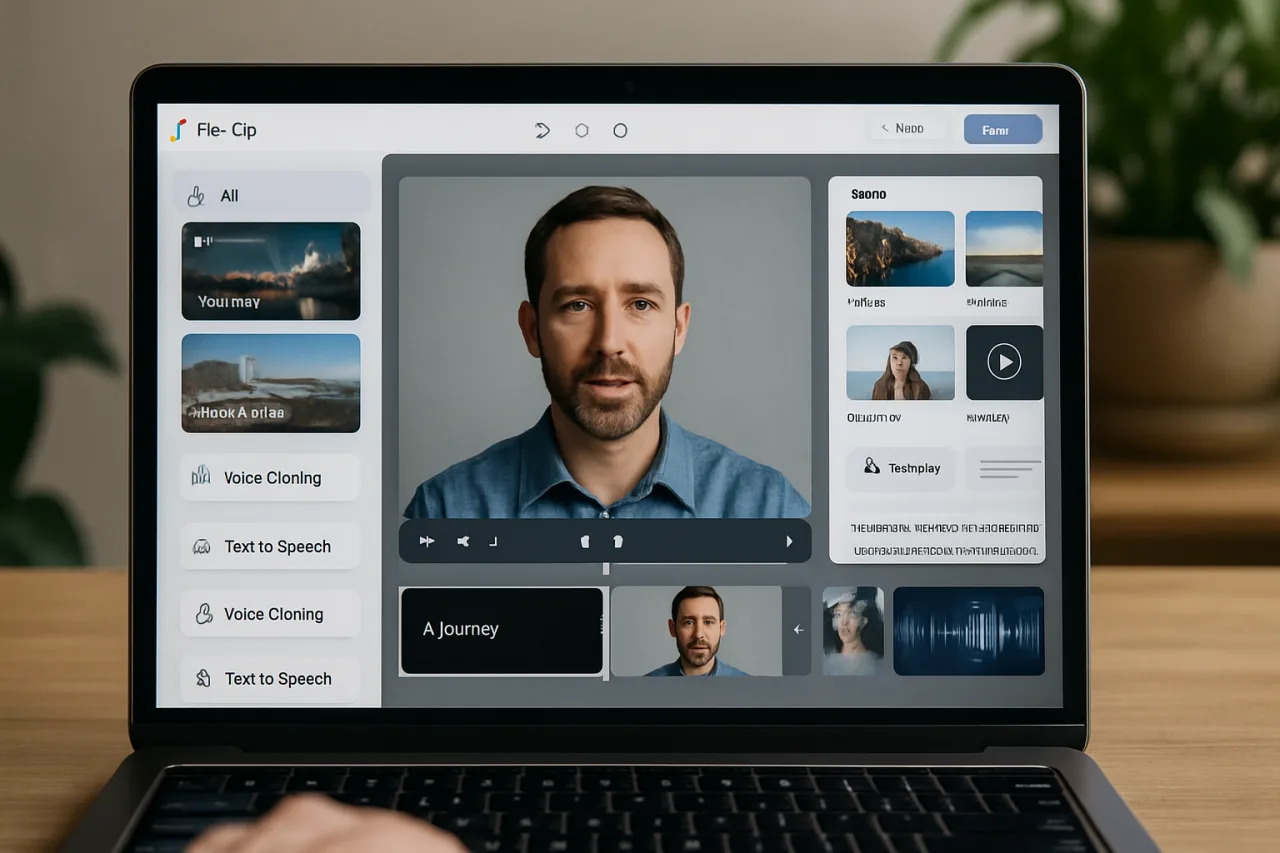
- 🎙️ Full AI Suite: AI text-to-video, image-to-video, voice cloning, text-to-speech in 140+ languages, AI music generation, AI avatars, automatic subtitles, long-to-shorts conversion, and text-based video editing
- 💰 Pricing: Free plan with 720p exports (watermarked). Plus at $11.99/month (billed annually) with 1080p and 3,600 AI credits. Business at $19.99/month with unlimited stock media and 9,600 AI credits
- 📊 Ratings: 4.4-4.7 out of 5 across G2, Capterra, Trustpilot, and AppSumo — praised for ease of use, template library, and AI tool value for beginners
- 🔧 Best For: Bloggers, YouTubers, social media creators, educators, marketers, and small businesses who want AI video creation without managing multiple separate tools
FlexClip has quietly become one of the most capable browser-based AI video editors available in 2026. While most AI video tools force you to choose one model — OpenAI’s Sora, Google’s Veo, or Kling — FlexClip gives you access to all five major AI video generation models in a single browser tab: Google Veo 3, OpenAI Sora 2, Kling, Hailuo, and ByteDance Seedance 2.0. Combined with 6,000+ templates, 4 million stock media assets, AI voice cloning, text-to-speech in 140+ languages, and AI avatars, it is an all-in-one platform that eliminates the need to stitch together multiple applications for a single video project.
For content creators, educators, and small businesses, the appeal is straightforward: instead of learning Premiere Pro, subscribing to ElevenLabs for voiceovers, paying for a separate AI video generator, and using yet another tool for subtitles, FlexClip bundles the entire workflow into one browser-based editor. The question is whether the convenience comes at the cost of quality. After testing the platform’s core features and reviewing independent assessments, the answer depends on what you need — and FlexClip is honest about where it excels and where dedicated tools still win.
AI Video Generation — 5 Models in One Platform
The headline feature that separates FlexClip from every other browser-based video editor in 2026 is its multi-model AI video generation. According to Saastrac’s review, FlexClip’s AI Video Generator integrates Hailuo, Kling, Google Veo 3, ByteDance Seedance 2.0, and OpenAI Sora 2 — giving users access to the same models that compete in the AI video arena, but without requiring separate subscriptions to each.
Text-to-Video mode lets you type a prompt and select an aspect ratio, and FlexClip’s AI generates a complete video scene with transitions, text, and music. Image-to-Video mode starts from a still image — a product shot, a character reference, or a poster frame — and animates it. The advantage of image-to-video is that the input locks composition and identity more tightly than text alone, which is why it is often the most practical route for brand and product content.
Beyond generation, FlexClip offers content repurposing tools that turn existing material into video. The Article/URL to Video feature converts written content — scripts, blog posts, articles — into video format. AI PPT to Video transforms presentations into narrated video content. Product URL to Video creates promotional videos from a product page. For creators who produce written content and want to expand into video without starting from scratch, these tools compress what used to be a multi-hour production process into minutes.
AI Voice and Audio — Cloning, Text-to-Speech, and Music
FlexClip’s audio suite covers the full range of AI voice and sound tools. AI Text to Speech generates natural-sounding voiceovers from text in 140+ languages, adding them directly to videos, tutorials, and presentations. While the quality is functional for quick projects — one reviewer at Blog Recode rated it 6.5/10 — it is not as realistic as dedicated voice tools like ElevenLabs or Murf.ai, which we ranked in our Best AI Voice Tools 2026 guide.
AI Voice Cloning lets creators replicate a specific voice for consistent narration across multiple videos. The AI Music Generator produces original background tracks without licensing concerns, which is particularly useful for YouTubers and social media creators who need royalty-free audio. The AI Sound Effect Generator creates custom sound effects from descriptions, and the AI Audio Translator converts spoken content between languages.
For creators who need both voice and video in one workflow, FlexClip’s integrated approach is the value proposition. Instead of generating a voiceover in ElevenLabs, downloading it, importing it into a video editor, and syncing it manually, FlexClip handles the entire chain inside one browser window. The trade-off is that each individual tool is slightly less powerful than its dedicated equivalent — but the integration saves enough time that most creators will accept the quality gap.
Editing Features — Beyond AI Generation
FlexClip is not just an AI generator. It is a full browser-based video editor with drag-and-drop functionality, timeline editing, transitions, text overlays, animations, and effects. The editor supports trimming, merging, splitting, speed adjustments, chroma key (green screen), screen recording, video collage, and freeze frames. Export quality reaches 1080p Full HD on paid plans with no watermark and no video length limit.
Two editing features stand out for content creators. AI Long to Shorts, a newer addition, transforms long videos into ready-to-share short clips with AI-selected highlights, automatic subtitles, and smart reframing for vertical formats. This is directly relevant for creators who produce long-form YouTube content and want to repurpose it for TikTok, Instagram Reels, and YouTube Shorts without manual editing.
AI Text-Based Editing lets you edit talking videos by editing text — the same approach Descript pioneered. You trim, remove, and refine spoken content by deleting words in the transcript rather than scrubbing through a timeline. For tutorial creators, podcast producers, and anyone who makes talking-head videos, this dramatically speeds up the editing process.
AI Image Tools — A Full Photo Suite
FlexClip’s AI Image suite is surprisingly deep for a video platform. It includes AI Text to Image generation, AI Image Background Remover, AI Object Remover, AI Photo Editor, AI Image Upscaler, AI Headshot Generator, AI Old Photo Restoration, AI Watermark Remover, and AI Image Extender. These tools are useful for creating thumbnails, social media graphics, and visual assets that accompany video content.
The AI Headshot Generator is particularly relevant for professionals who need polished profile photos. The AI Image Upscaler enhances low-resolution images for use in video projects. And the AI Background Remover works on both images and video — a feature that dedicated video editors often charge extra for.
Pricing — Free, Plus, and Business Plans
FlexClip uses a freemium model verified against the official FlexClip pricing page and multiple independent reviews. All prices below reflect annual billing for 2026.
| Plan | Price (annual) | Export | AI Credits | Stock Media | Cloud Storage |
|---|---|---|---|---|---|
| Free | $0 | 720p, watermarked | 5 text-to-video/month | 1 per project | Limited |
| Plus | $11.99/month | 1080p, no watermark | 3,600/year (300/month) | 5 per project | 30GB |
| Business | $19.99/month | 1080p, no watermark | 9,600/year (600/month) | Unlimited | 100GB |
| AI Credits | $9.90/300 credits | N/A | Top-up only | N/A | N/A |
The Free plan is genuinely usable — 720p exports with a FlexClip watermark, up to 12 projects, videos up to 10 minutes, and 5 AI text-to-video generations per month. For testing the platform or creating personal content, it works without a credit card.
The Plus plan at $11.99/month (billed annually) is the sweet spot for solo creators. It removes the watermark, unlocks 1080p exports, provides 300 AI credits per month, and allows 5 stock videos and audio clips per project. The Business plan at $19.99/month adds unlimited stock media, 600 AI credits per month, 100GB cloud storage, 1TB export storage, team collaboration, and priority support.
FlexClip also offers a 40% student discount through Student Beans for verified students, graduates, and teachers. All paid plans include a 7-day money-back guarantee.
AI Credits — How the System Works
FlexClip’s generative AI features are powered by AI credits, which are consumed when you use text-to-video generation, image generation, AI translation, and similar tools. The Plus plan includes 3,600 credits per year (300 per month), and the Business plan includes 9,600 credits per year (600 per month). Additional credits can be purchased through the standalone AI Credits plan starting at $9.90 for 300 credits.
The credit system gives users clear visibility into and control over their AI usage. Unlike subscription models that charge per generation or impose hidden limits, FlexClip’s credit system lets you see exactly how much each AI action costs and budget accordingly. The main limitation is that heavy users of text-to-video generation — which consumes more credits than simpler tools like background removal — may find the monthly allocation insufficient and need to purchase top-up credits.
Who Should Use FlexClip — and Who Should Not
FlexClip is designed for creators who want AI-assisted video production without the complexity of professional desktop software. Based on verified user reviews and our analysis, the platform is best suited for:
- Bloggers and writers who want to repurpose articles into video content using the Article/URL to Video feature — no camera, no editing skills required
- YouTubers and social media creators who need fast turnaround on video content, thumbnails, and Shorts repurposed from longer videos
- Small businesses and marketers who need promotional videos, product demos, and social media content without hiring a video production team
- Educators and trainers who want to create tutorial videos, course content, and instructional materials with AI voiceovers and automatic subtitles
- OFW content creators who want to produce professional video content remotely — as we noted in our Best AI Tools for Content Creation 2026 guide, FlexClip’s browser-based approach works from any location
FlexClip is not the right tool for professional post-production work that requires 4K color grading, advanced audio mixing, or multi-camera editing. As Ampifire’s review noted, “professional post-production projects still demand a desktop tool.” It is also not the best choice for creators who need the absolute highest quality AI voice generation — dedicated tools like ElevenLabs still produce more natural-sounding voices. FlexClip’s strength is integration, not specialization.
How FlexClip Compares to Alternatives
FlexClip occupies a unique position in the AI video tool landscape. It is not a pure AI video generator like Runway or Pika Labs, which focus on AI clip generation but lack a full editor. It is not a professional editor like Adobe Premiere Pro or DaVinci Resolve, which offer advanced features but require desktop installation and significant learning time. And it is not a simple template tool like Canva’s video features, which are limited in editing depth.
FlexClip sits in the middle — a browser-based editor with professional-grade AI generation tools integrated directly into the workflow. The closest competitor is CapCut, which we also reviewed in our content creation tools guide. CapCut is free and offers strong AI editing features, but it does not integrate multiple AI video generation models the way FlexClip does. The choice between them comes down to whether you need AI video generation (FlexClip) or AI-assisted editing of your own footage (CapCut).
For creators who need voice specifically, our Best AI Voice Tools 2026 guide ranks ElevenLabs as the overall best for voice quality, with FlexClip as the best integrated option for creators who want voice and video in one platform.
Frequently Asked Questions About FlexClip
What is FlexClip and what does it do?
FlexClip is a browser-based AI video editor that combines a drag-and-drop video editor with AI tools including text-to-video generation, AI voice cloning, text-to-speech in 140+ languages, AI music generation, AI avatars, automatic subtitles, and content repurposing. It integrates five AI video models: Google Veo 3, OpenAI Sora 2, Kling, Hailuo, and ByteDance Seedance 2.0.
How much does FlexClip cost in 2026?
FlexClip offers a Free plan (720p, watermarked, 5 AI generations/month), a Plus plan at $11.99/month billed annually (1080p, no watermark, 300 AI credits/month), and a Business plan at $19.99/month billed annually (unlimited stock media, 600 AI credits/month, team collaboration). A standalone AI Credits plan starts at $9.90 for 300 credits. Students get 40% off through Student Beans.
Does FlexClip have a free plan?
Yes. The free plan allows videos up to 10 minutes, up to 12 projects, 720p export with a FlexClip watermark, 1 stock video and 1 stock audio per project, and 5 AI text-to-video generations per month. No credit card is required.
Which AI video models does FlexClip support?
FlexClip integrates five AI video generation models: Google Veo 3, OpenAI Sora 2, Kling, Hailuo (Minimax), and ByteDance Seedance 2.0. Users can select which model to use for text-to-video and image-to-video generation, with each model offering different strengths in terms of realism, motion, and style.
Is FlexClip good for YouTube creators?
Yes. FlexClip is useful for YouTube creators who need video editing, AI voiceovers, thumbnails, and the ability to convert long videos into Shorts. The AI Long to Shorts feature automatically selects highlights from longer videos and reformats them for vertical platforms like YouTube Shorts and TikTok.
How does FlexClip compare to CapCut?
CapCut is a free AI-powered video editor focused on editing existing footage. FlexClip is a broader platform that includes AI video generation (text-to-video using 5 models), AI voice cloning, content repurposing (article-to-video, PPT-to-video), and a template library. CapCut is better for editing your own video clips; FlexClip is better for generating new video content from text, images, or existing written material.
Can FlexClip clone voices?
Yes. FlexClip includes an AI Voice Cloning tool that creates a digital copy of a specific voice from audio recordings. This is useful for creators who want consistent narration across multiple videos. Voice cloning should only be used for your own voice or with explicit permission from the voice owner.
This article is for informational and educational purposes only and does not constitute professional advice. FlexClip is a featured partner of WorldNgayon.com. All pricing and feature information was verified against the official FlexClip website and independent review sources as of August 2026. WorldNgayon.com is not liable for any actions taken based on the information presented here.
- flexclip.com/editor — FlexClip
- aiagents.saastrac.com/flexclip-review — Saastrac’s review
- blogrecode.com/flexclip-review-after-making-50-videos-in-30-days — Blog Recode rated it 6.5/10
- flexclip.com/pricing.html — official FlexClip pricing page
- ampifire.com/blog/flexclip-ai-reviews-pricing-features-is-this-the-be… — Ampifire’s review
External sources linked in this article, in order of first mention. Spotted an error or a broken link? Tell us.
Cite this pagePublished Aug 18, 2026 · Updated Sept 19, 2026
Agron, E. (2026, August 18). FlexClip Review: 5 AI Models, Voice Cloning, and Content Repurposing — All in Your Browser. WorldNgayon. https://worldngayon.com/flexclip-review-2026/
Agron, Edmon. “FlexClip Review: 5 AI Models, Voice Cloning, and Content Repurposing — All in Your Browser.” WorldNgayon, 18 Aug. 2026, worldngayon.com/flexclip-review-2026/.
Agron, Edmon. “FlexClip Review: 5 AI Models, Voice Cloning, and Content Repurposing — All in Your Browser.” WorldNgayon, August 18, 2026. https://worldngayon.com/flexclip-review-2026/.
Agron, E. (2026) ‘FlexClip Review: 5 AI Models, Voice Cloning, and Content Repurposing — All in Your Browser’, WorldNgayon, 18 August. Available at: https://worldngayon.com/flexclip-review-2026/.
E. Agron, “FlexClip Review: 5 AI Models, Voice Cloning, and Content Repurposing — All in Your Browser,” WorldNgayon, Aug. 18, 2026. [Online]. Available: https://worldngayon.com/flexclip-review-2026/
@online{agron2026flexclipreview,
  author       = {Agron, Edmon},
  title        = {{FlexClip Review: 5 AI Models, Voice Cloning, and Content Repurposing — All in Your Browser}},
  year         = {2026},
  date         = {2026-08-18},
  organization = {WorldNgayon},
  url          = {https://worldngayon.com/flexclip-review-2026/},
  urldate      = {}
}TY - ELEC AU - Agron, Edmon TI - FlexClip Review: 5 AI Models, Voice Cloning, and Content Repurposing — All in Your Browser T2 - WorldNgayon PY - 2026 DA - 2026/08/18/ UR - https://worldngayon.com/flexclip-review-2026/ Y2 - ER -
Cite the version you read; the page may be updated. Zotero and Mendeley can also import this page directly.