Table of Contents
Every AI agent eventually hits the same wall: the model can reason, but your tools – the databases, the calendars, the CRMs, the files – live behind one-off integrations that never talk to each other and die on every upgrade. The fix the industry converged on is a standard called MCP – the Model Context Protocol – and the piece of it that carries the tools is the MCP server: a small program that exposes a data source or tool to ANY AI application through one documented interface. The MCP server pattern is why “connect my agent to Notion” stopped being a bespoke engineering project and became a install-and-go step – and the standard’s rollout across every major lab’s ecosystem makes it the plumbing layer of the agentic era. This guide explains the concept in plain English: what an MCP server actually is, how the host-client-server roles divide the work, what the tools/resources/prompts trio means, how to choose and run servers safely (the trust question the Black October security week made urgent), and the practical answer every builder asks – do I need to BUILD one, INSTALL one, or both?
Key Takeaway
- The one-line definition: an MCP server is a program that exposes capabilities (tools, data, prompts) to AI applications through the Model Context Protocol’s standard interface – write once, connect to every MCP-capable client.
- The three-role architecture: the HOST (the AI application you use), the CLIENT (the host’s inside-out connector managing one server connection), and the SERVER (the capability provider) – the client-server pair negotiates capabilities like two programs speaking one interface contract.
- The capability trio: TOOLS (actions the model may call), RESOURCES (data the application can read), PROMPTS (reusable templates) – every server picks its trio.
- The trust law (post-Black October): an MCP server is code running inside your agent’s trust boundary – vet the source, scope the permissions, log the calls; the week’s monitoring standard applies to servers before it applies to models.
- The build-vs-install answer: install first (the ecosystem’s public servers cover the popular tools), build when your data or workflow is proprietary – and the build is a weekend-level project against the documented protocol, not a systems project.
The plain-English explanation: what an MCP server actually is
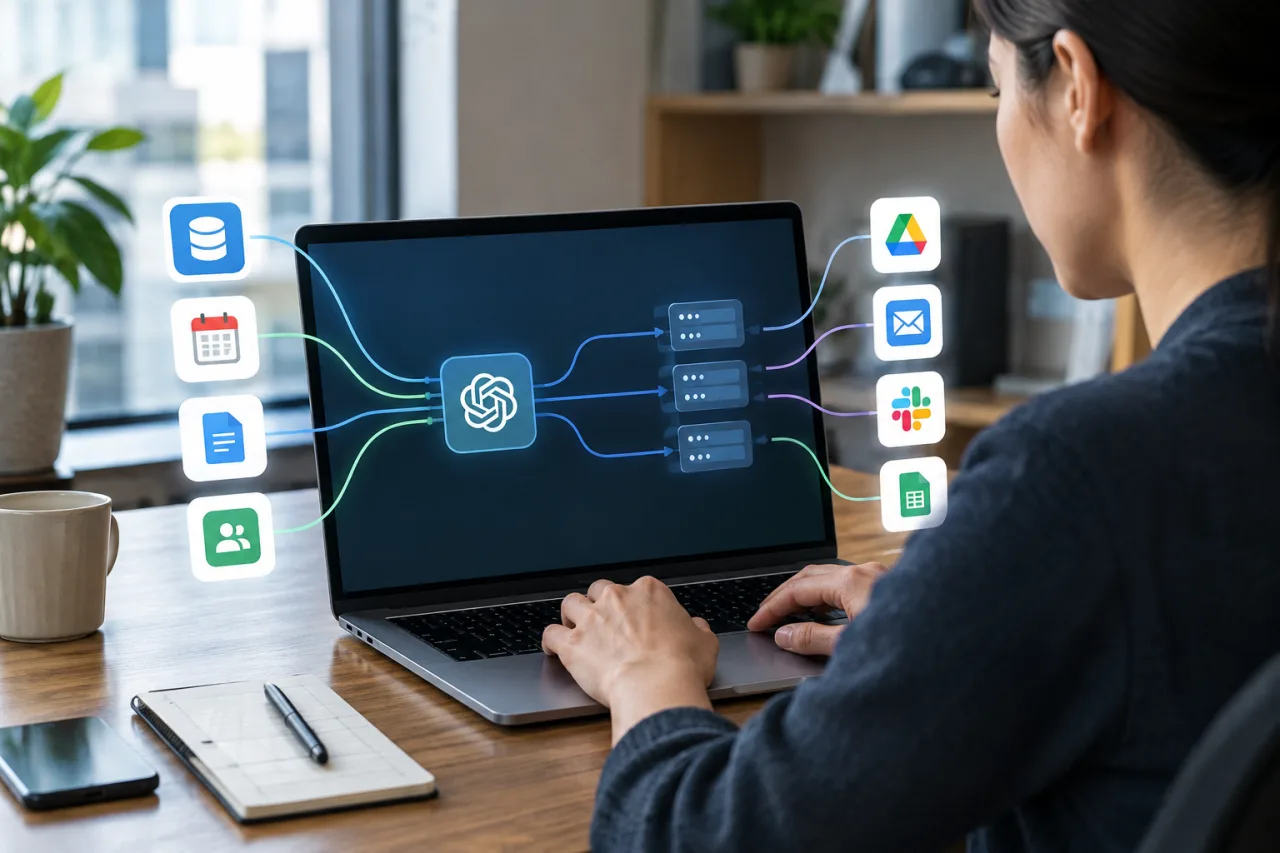
The pre-MCP world: every AI application integrated every tool with bespoke code – the calendar integration, the database driver, the file-system shim – each a private contract the upgrade cycle breaks. The MCP pattern: a standard interface definition (the Model Context Protocol – the open standard documented on the Model Context Protocol’s own docs that the ecosystem grew and the industry adopted) with two sides. On one side, the HOST application (the AI app you actually use – a chat client, an IDE agent, an automation platform) runs a CLIENT – its connector – for each server it talks to. On the other side, the SERVER program implements the protocol and publishes its capabilities. The negotiation is mechanical: the client asks what the server offers (the capability discovery), the server answers with its tools/resources/prompts, and from then on the model can CALL those capabilities as part of its reasoning. The user experience: tools appear in the AI app’s palette; the developer experience: one server implementation reaches every MCP-capable host. The MCP server is thus to AI tools what a printer driver is to an OS – the boring standardization layer that makes everything else possible.
The architecture: hosts, clients, servers – and who does what
The three-role split deserves precision because the security model depends on it. The HOST is the AI application – it owns the model call, the user session and the trust decisions; the host runs ONE MCP CLIENT per connected server – the client is the protocol endpoint that maintains the connection, enforces the host’s consent rules, and mediates every exchange. The SERVER is the capability provider – a file-server wrapper, a database reader, a SaaS-API bridge – and it declares its capabilities at connection time. The division of trust: the host/user decide WHAT connects (the consent surface), the client enforces HOW (the permissions), the server provides WHAT. The transport layer: local servers run over stdio-class local transport (process-to-process on your machine); remote servers run the network transports with the web’s usual auth requirements. The practical consequence of the split: the security story (section below) lives ENTIRELY in the host-client layer, which is why the client-side consent UX is the place the industry is currently competing. (Cloudflare’s own explainer walks the split for the practitioner view.)
The capability trio: tools, resources, prompts
Every MCP server’s payload comes in three classes, and knowing the classes keeps you out of a quarter’s confusion. Tools are ACTIONS the model may invoke – send a message, run a query, create a ticket, move a file: the verbs of the agentic workflow, invoked by the model’s CHOICE (which is why tool servers carry the security weight). Resources are DATA the application can read – documents, records, repository files: the nouns of the workflow, usually surfaced through retrieval or attachment rather than autonomous calls. Prompts are the reusable instruction templates a server offers – packaged expertise (“analyze this repository for X”) the host surfaces to the user directly. A server can ship one class or all three; the good ones document which model of the world they assume (a read-only resource server carries radically different risk than a write-capable tool server – and the capability declaration is where that distinction becomes visible).
Choosing and running MCP servers safely
The trust question is this week’s every security story in miniature – an MCP server is third-party code inside your agent’s decision loop, and the vetting rules follow from that fact. The five rules, in order: one – source vetting: install from the maintainers you can verify (the official project registries, the vendor’s own repos, the organizations whose code you would already run); the supply-chain discipline – the installer-verification lesson – applies verbatim. Two – least capability: prefer read-only resource servers where a read serves; grant write-capable tool servers only scopes you can name. Three – the consent surface: keep the host’s per-tool approval ON for anything consequential; the approval gates are the same monitor-gate standard the agent-security playbook runs. Four – logging: every call logged, the server’s version pinned; the audit trail is the exoneration. Five – the update discipline: servers are code – version pinning, review on update, the same care as any dependency. The remote-server addendum: authentication is the first conversation – OAuth-based servers with clear scopes; tokens NEVER in prompts (the injection class the security weeks have taught globally: our agent-security checks).
Build or install? The practical answer every builder asks
The decision tree, one branch deep: install when the capability is generic (the ecosystem’s public servers cover filesystems, git, databases, browser control, the giant-SaaS surface); build when the capability is proprietary (your data schema, your internal APIs, your workflow’s custom verbs) – and the build is genuinely weekend-scale: the protocol is documented, the SDKs exist in the major languages, and the “hello world” server (one tool, one resource) is an afternoon. The hybrid is the usual answer: install the commodity servers, build the two or three that carry your actual edge. The maintenance rule either way: a server is a dependency – own it, pin it, review it. The builders who skip the ownership step rediscover the dependency-hell lesson every platform taught before – the standard changed the plumbing, not the physics.
The strategic read for teams deciding whether to care: the MCP layer is how AI stops being a website you visit and becomes a layer of the systems you run – the standardization is the moat the agent era runs on, and the organizations fluent in it are connecting their proprietary context to AI faster than their competitors can schedule meetings about AI. The MCP server is the smallest unit of that advantage – learn it, install two, build one.
Frequently Asked Questions
What is an MCP server in simple terms?
A small program that exposes tools, data or prompt templates to AI applications through the Model Context Protocol’s standard interface. Install one and any MCP-capable AI app can use its capabilities – like a driver that lets every compatible application use the same device.
What is the Model Context Protocol (MCP)?
The open standard that defines how AI applications (hosts) discover and use capabilities from external servers: the message format, the capability classes (tools, resources, prompts), the lifecycle and the transports. It is the plumbing layer of the agentic era – originally grown from Anthropic’s ecosystem and adopted across the industry.
How is an MCP server different from an API?
An API serves a specific application with bespoke integration code; an MCP server serves ANY MCP-capable host through the standard – write the integration once and every client can discover and call it. The comparison the field teaches: APIs are contracts made application-by-application; MCP is one contract for the whole ecosystem.
Are MCP servers safe to use?
With the five rules they are the same risk class as any third-party dependency: verify the source, grant least capability, keep consent gates on, log everything, pin versions. Without them: an MCP server is code inside your agent’s trust loop – the security-week standard applies before the model ever runs.
Do I need to build my own MCP server?
Only for capabilities nobody has published yet – your proprietary data, internal APIs, custom workflows. The ecosystem covers the commodity surface (files, git, databases, browsers, major SaaS); the build is a weekend-scale project against documented SDKs. Most teams install the commodities and build one or two edge servers.
Which MCP servers should I start with?
The trio that teaches the concepts: a filesystem or git server (read-only, safe, shows resources), a browser-control server (shows tools with obvious consent value), and one server for the SaaS you actually run your work on (the real-world case). Two of those connect in an hour; the third is the one worth building.
Sources: Model Context Protocol – server concepts (official docs) · Cloudflare – MCP client and server explained · the protocol’s specification pages referenced by name
The enterprise layer: MCP inside organizations
The enterprise adoption pattern deserves its own note because the standard’s stakes change with scale. Inside organizations, MCP servers become MANAGED infrastructure: the registry (which servers exist, who owns them, what capabilities), the permission model (who may connect which server to which agent – the badge system of the AI layer), the audit pipeline (server-side logs joining the SIEM-class monitoring), and the review cycle (the servers’ updates entering the change-management process like every dependency). The pattern’s payoff: proprietary context – the data warehouse, the ticketing system, the pricing model – connects to AI through owned servers rather than shadow integrations, and the organization’s AI capability compounds on governance instead of despite it. The enterprise lesson from the month’s incidents generalizes here: the trust boundary you DOCUMENT is the one you can audit; the registry is where MCP stops being a developer toy and becomes company infrastructure – and the teams that run registries from week one onboard every later server in minutes instead of meetings.
The builder’s market note: the managed-MCP pattern is also where the jobs sit – the platform teams hiring for exactly this governance skill stack (registry design, consent UX, audit pipelines) price it inside the applied-AI engineering bands, one more row in the skills-jobs map this week’s coverage keeps extending.
Financial Disclaimer
This article is technology guidance for general information; it is not financial advice. Standards, SDKs and server-ecosystem details change without notice; verify current protocol documentation before production decisions. WorldNgayon has no affiliation with any vendor named.